



Jump to content
View in the app

A better way to browse. Learn more.

Tinkerunity

A full-screen app on your home screen with push notifications, badges and more.

To install this app on iOS and iPadOS
  1. Tap the Share icon in Safari
  2. Scroll the menu and tap Add to Home Screen.
  3. Tap Add in the top-right corner.
To install this app on Android
  1. Tap the 3-dot menu (⋮) in the top-right corner of the browser.
  2. Tap Add to Home screen or Install app.
  3. Confirm by tapping Install.

WimmerM

Members
  • Benutzer seit

  • Letzter Besuch

Alle erstellten Inhalte von WimmerM

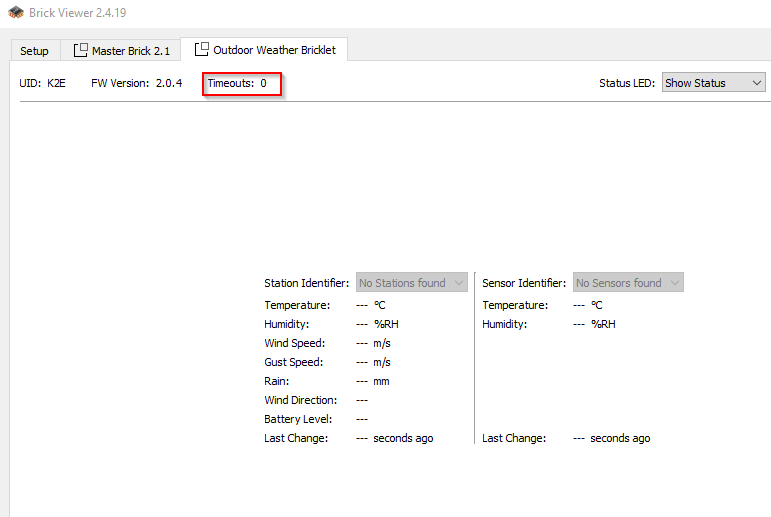
  1. Hallo ich habe seit einiger Zeit keine Verbindung zur Wetterstation WS-6147 mehr. Mein Aufbau: Masterbrick mit Ethernet Master Extension und WeatherBricklet an Port B. Wenn ich die Batterien aus der Station nehme dann leuchtet die rote LED für ca 5Sekunden, dann aus. im Brick Viewer kommen aber keine Daten an, es wird aber auch kein Timeout angezeigt?? woran könnte das liegen? Vielen Dank Markus
Configure browser push notifications

Chrome (Android)
  1. Tap the lock icon next to the address bar.
  2. Tap Permissions → Notifications.
  3. Adjust your preference.
Chrome (Desktop)
  1. Click the padlock icon in the address bar.
  2. Select Site settings.
  3. Find Notifications and adjust your preference.