mechanix
Members
-
Benutzer seit
-
Letzter Besuch
-
Hello batti, thanks for your reply. The motor is running now and I started to test it already. Thanks.
-
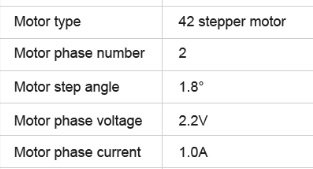
Good Day I am a very newbie to tinkerforge and electronics at all. I have few probably dumb questions, but maybe can help me? I am trying to move a small stepper motor with phase voltage/current 2,2V/ 1,0A. I have connected wires as shown in documentation of a Stepper Brick, but it doesnt move. I have no extra power supply, the Brick is connected via USB to a desktop computer. 1. Do I need external power supply for this motor? Does it have to be 2,2V (see also question 3)? 2. Do I need to adjust the standard current settings of a brick? 3. I have troubles understanding the connection between a brick and a motor, when it comes about voltage. Can someone explain how does the brick can supply different motors, with different voltages, without a need to adjust anything? This is beggining of my story with electronics, so please have patience... Thank you for your time and answers!