J-A-U
Members
-
Benutzer seit
-
Letzter Besuch
-
J-A-U ist der Community beigetreten
-
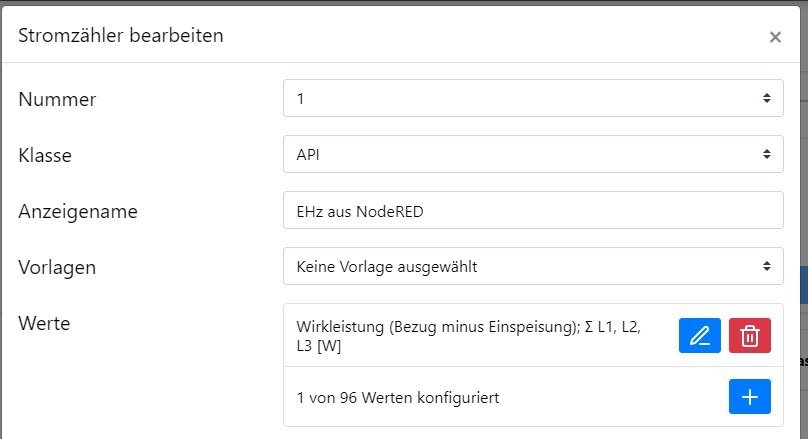
So einfach kann es sein... Wie oben schon versucht bei mir auch mit NodRED: [ { "id": "52804565cbcf1689", "type": "tab", "label": "VZ 2 WARP", "disabled": false, "info": "", "env": [] }, { "id": "e4eba1ad777559a3", "type": "template", "z": "52804565cbcf1689", "name": "", "field": "payload", "fieldType": "msg", "format": "handlebars", "syntax": "mustache", "template": "[{{payload}}]", "output": "json", "x": 300, "y": 460, "wires": [ [ "0719a18065e47ab4", "aa15a307f317f53d" ] ] }, { "id": "0719a18065e47ab4", "type": "http request", "z": "52804565cbcf1689", "name": "", "method": "POST", "ret": "txt", "paytoqs": "ignore", "url": "http://172.30.0.29/meters/1/update", "tls": "", "persist": false, "proxy": "", "authType": "", "senderr": false, "x": 470, "y": 460, "wires": [ [ "71758e0d4c88d925" ] ] }, { "id": "71758e0d4c88d925", "type": "debug", "z": "52804565cbcf1689", "name": "debug 1", "active": false, "tosidebar": true, "console": false, "tostatus": false, "complete": "payload", "targetType": "msg", "statusVal": "", "statusType": "auto", "x": 640, "y": 460, "wires": [] }, { "id": "6cdc4c649b2feb03", "type": "debug", "z": "52804565cbcf1689", "name": "debug 2", "active": true, "tosidebar": true, "console": false, "tostatus": false, "complete": "payload", "targetType": "msg", "statusVal": "", "statusType": "auto", "x": 1140, "y": 540, "wires": [] }, { "id": "b5f841663cbd93c5", "type": "link in", "z": "52804565cbcf1689", "name": "", "links": [ "ef1b1595e6d6d19e" ], "x": 175, "y": 460, "wires": [ [ "e4eba1ad777559a3" ] ] }, { "id": "aa15a307f317f53d", "type": "debug", "z": "52804565cbcf1689", "name": "", "active": false, "tosidebar": true, "console": false, "tostatus": false, "complete": "true", "targetType": "full", "statusVal": "", "statusType": "auto", "x": 470, "y": 500, "wires": [] } ] Der Input kommt bei mir von vzlogger, das ist einfach die aktuell Leistung mit Vorzeichen. Als JSON eingetütet und auf die WARP geworfen. Zähler mit Nummer 1 wurde wie oben beschrieben eingerichtet: Nr 1, erstellt mit SDM72 Template und alle Werte außer der Leistung entfernt.