Benji
Members
-
Benutzer seit
-
Letzter Besuch
-
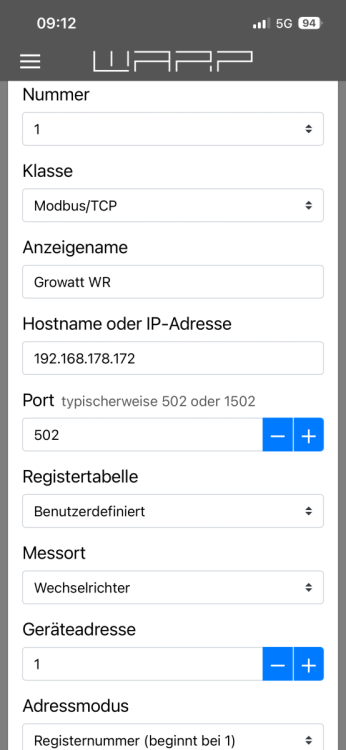
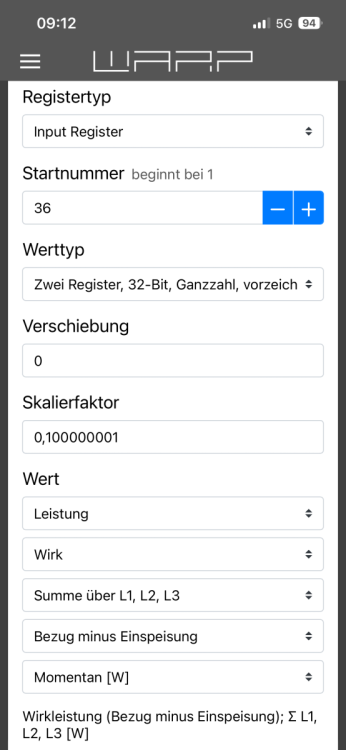
Hallo, ich habe einen Elfin EW11 an den COM Stecker (Pins 3 und 4) des Wechselrichters angeschlossen und bekomme auch Signale zur Warp3. Nur leider noch nicht die richtigen. Könnt ihr mir bei der Registerbelegung des Growatt helfen? Habe schon einige probiert, aber das Richtige war noch nicht dabei. In den angehängten Bildern seht ihr meine aktuelle Einstellung. Zeigt meist Werte zwischen 0w und 8.000w. Manchmal aber auch Fantasiewerte. Es scheint also irgendwie möglich, die korrekte Konfiguration finde ich allerdings nicht und wäre daher über Hilfe sehr dankbar. Viele Grüße Benji
-
Growatt MOD 10KTL3-XH
-
Hallo, wird Growatt mittlerweile unterstützt? Vielen Dank und beste Grüße Benji
-
Benji ist der Community beigetreten
-
Hallo zusammen, ich habe seit gestern die Warp3 Smart und würde diese gerne zur PV Überschussladung nutzen. Meine PV-Anlage ist von Growatt, die Kommunikation mit der ShinePhone App läuft über den ShineWifi X Stick. Mein Stromzähler ist der Eastron SDM630 Modbus V3 (kann meiner Recherche nach nicht drahtlos kommunizieren). Bisher bin ich gescheitert. Kann mir jemand helfen, wie ich dies ohne weitere Hardware bewerkstelligen kann? Herzlichen Dank im Voraus und viele Grüße Benji