



Jump to content
View in the app

A better way to browse. Learn more.

Tinkerunity

A full-screen app on your home screen with push notifications, badges and more.

To install this app on iOS and iPadOS
  1. Tap the Share icon in Safari
  2. Scroll the menu and tap Add to Home Screen.
  3. Tap Add in the top-right corner.
To install this app on Android
  1. Tap the 3-dot menu (⋮) in the top-right corner of the browser.
  2. Tap Add to Home screen or Install app.
  3. Confirm by tapping Install.

Enyaq-DUS

Members
  • Benutzer seit

  • Letzter Besuch

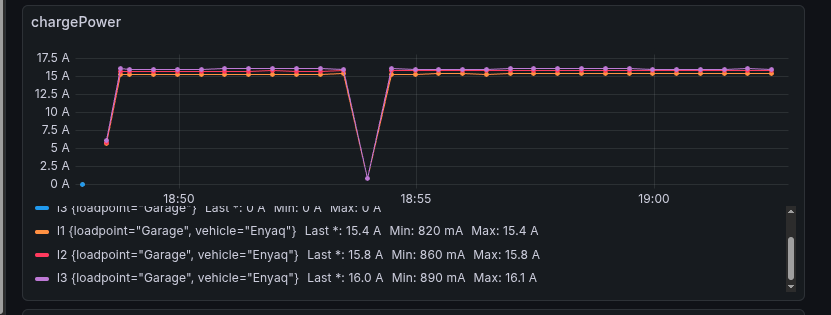
  1. Zur Info: So sieht es nun mit dem Boost-Modus aus: 11KW ! VG
  2. Hi Matze, vielen Dank für schnelle Antwort. Dann hake ich dies mal als "normal" ab und probiere mal den Boost-Modus aus. Diesen kann ich gefahrlos nutzen?? So sieht es übrigens bei mir aus:
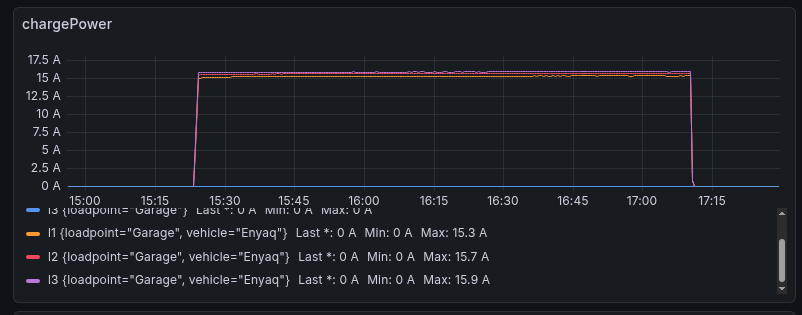
  3. Hallo, ich benutze seit einigen Monaten die WARP3 Charger Pro. Grundsätzlich bin ich sehr zufrieden. Mir ist nun aufgefallen, dass die warp mit max 10.8 KW lädt (mit und ohne Steuerung via evcc ) Auf L1 liegen max. 15.3 A, auf L2 15.7 A und auf L3 15.9 A an. Erwartet habe ich 3 x 16 A. Könnt Ihr mir bei der Fehlersuche auf die Sprünge helfen? Danke und VG

Configure browser push notifications

Chrome (Android)
  1. Tap the lock icon next to the address bar.
  2. Tap Permissions → Notifications.
  3. Adjust your preference.
Chrome (Desktop)
  1. Click the padlock icon in the address bar.
  2. Select Site settings.
  3. Find Notifications and adjust your preference.