



Jump to content
View in the app

A better way to browse. Learn more.

Tinkerunity

A full-screen app on your home screen with push notifications, badges and more.

To install this app on iOS and iPadOS
  1. Tap the Share icon in Safari
  2. Scroll the menu and tap Add to Home Screen.
  3. Tap Add in the top-right corner.
To install this app on Android
  1. Tap the 3-dot menu (⋮) in the top-right corner of the browser.
  2. Tap Add to Home screen or Install app.
  3. Confirm by tapping Install.

Ehmkay

Members
  • Benutzer seit

  • Letzter Besuch

  1. Hallo zusammen, folgendes Problem: Master brick mit einer Poe Ethernet Erweiterung. Schließe ich den Master via Usb an kann ich die Ethernet Erweiterung konfigurieren. Wenn ich das ganze aber über Lan (mit Poe switch ) betreibe bekomme ich nach 5-10 sekunden Timeouts des Masters und das Stack startet neu. Die Ethernet Schnittstelle blinkt ein paar mal bei der Traffic led und dann startet das stack wie gesagt neu. Und das geht immer so weiter. Hat jemand eine idee oder ist meine Poe Ethernet Erweiterung defekt? VG Ehmkay
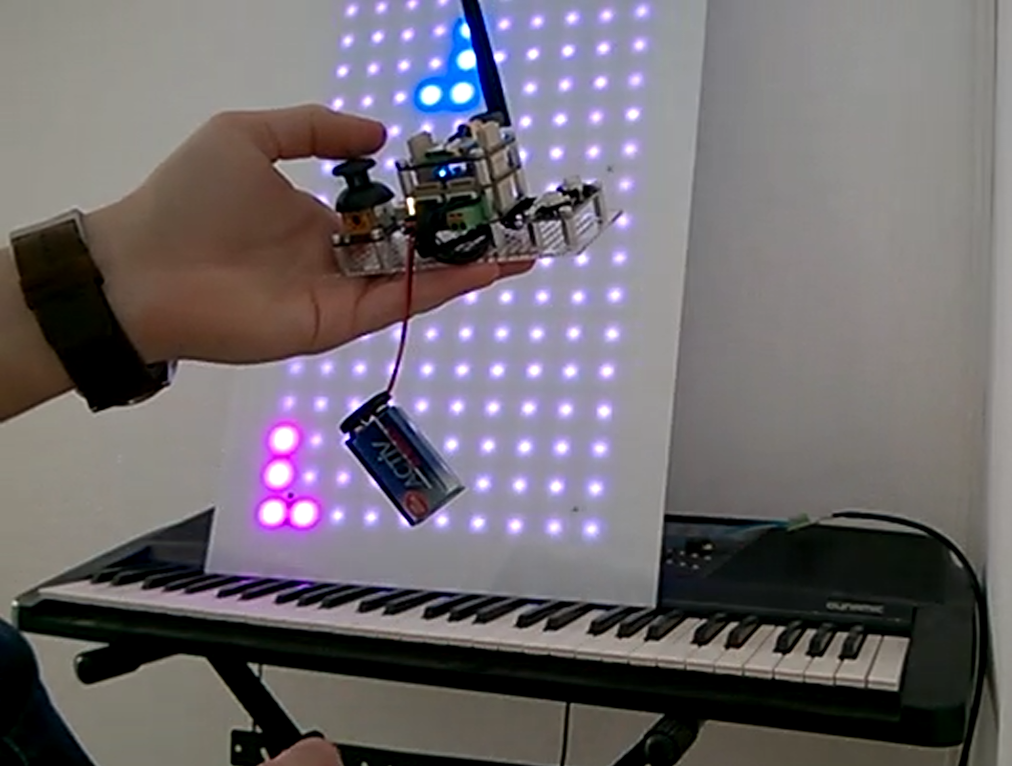
  2. Hier ein Test für eine Fernsteuerung für TF Tetris. Hoffe es gefällt und gibt vielleicht neue Ideen dazu. Grüße Ehmkay Tetris.mp4
Configure browser push notifications

Chrome (Android)
  1. Tap the lock icon next to the address bar.
  2. Tap Permissions → Notifications.
  3. Adjust your preference.
Chrome (Desktop)
  1. Click the padlock icon in the address bar.
  2. Select Site settings.
  3. Find Notifications and adjust your preference.