




cuky3
Members
-
Benutzer seit
-
Letzter Besuch
-
The timer works ok and displays only 1 tick in the debug. I have tried removing the timer completely and adding new button which will disconnect IP connection but I get the same exception. The ipcon.Disconnect(); only works if it is in public void Prikupljanje() or public void AccelerationCB(BrickletAccelerometerV2 sender, short[] acceleration), outside of these two methods I always get NotConnectedException. It seems like there is no communication between these two voids and other voids.
-
Hi, thank you for your answer. It solved the problem partially, when I add ipcon.Disconnect() to the Timer1_Tick I get the following exception: And if I remove ipcon.Disconnect() completely the values in Debug.WriteLine(string.Join(",", x)); just keep on coming and my text area is still empty. Do you have any further suggestions?
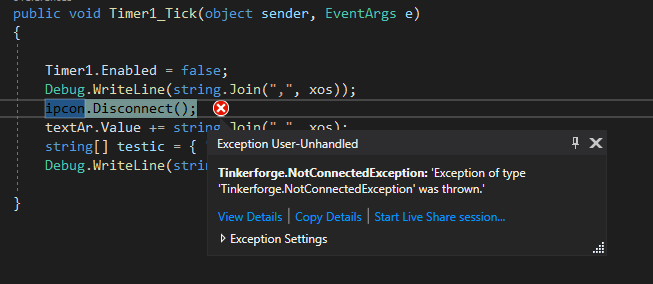
-
Hello all, I have the following setup: Master Brick, Accelerometer 2.0, Ethernet Master Extension and the RED brick. For my project I am developing a web application for accelerometer data acquisition using Visual Studio ASP.NET Web Forms written in C#. I have successfully configured local area network, added TinkerForge C# bindings and my basic console app example works very well. However when I code in a Web Form my code doesn't get executed. My web app consists of two drop down menus where you can choose frequency (ID="DropDownList2") and data rate (ID="DropDownList1") as well as input (ID="Time") in which user specifies duration of an acquisition. After the defined time x values needs to be printed in the text area (ID="textAr"). To start the acquisition a button Start is pressed which executes a method in code behind. To control time an AJAX timer and ScriptManager is used. All items are in html <form/> tag and runat server. My code behind looks like this: using System; using System.Collections.Generic; using System.Diagnostics; using System.Dynamic; using System.Linq; using System.Web; using System.Web.UI; using System.Web.UI.WebControls; using Tinkerforge; namespace Prikupljanje_podataka { public partial class WebForm1 : System.Web.UI.Page { protected void Page_Load(object sender, EventArgs e) { } const string HOST = "192.168.150.3"; const int PORT = 8080; const string UID = "Jej"; public IPConnection ipcon = new IPConnection(); public List<short> xos = new List<short>(); public List<short> yos = new List<short>(); public List<short> zos = new List<short>(); public void Start_Click(object sender, EventArgs e) { Prikupljanje(); int t1 = Convert.ToInt32(Time.Value); int t2 = t1 * 1000; Timer1.Enabled = true; Timer1.Interval = t2; } public void Prikupljanje() { byte fr = Convert.ToByte(DropDownList2.SelectedValue); byte rn = Convert.ToByte(DropDownList1.SelectedValue); ipcon.Connect(HOST, PORT); BrickletAccelerometerV2 a = new BrickletAccelerometerV2(UID, ipcon); a.SetConfiguration(fr, rn); a.GetConfiguration(out byte dataRate, out byte fullScale); System.Diagnostics.Debug.WriteLine(Convert.ToString(dataRate)); System.Diagnostics.Debug.WriteLine(Convert.ToString(fullScale)); a.SetContinuousAccelerationConfiguration(true, true, true, Convert.ToByte(1)); a.ContinuousAcceleration16BitCallback += AccelerationCB; ipcon.Disconnect(); } public void AccelerationCB(BrickletAccelerometerV2 sender, short[] acceleration) { short[] akc = acceleration; short[] x = { akc[0], akc[3], akc[6], akc[9], akc[12], akc[15], akc[18], akc[21], akc[24], akc[27] }; short[] y = { akc[1], akc[4], akc[7], akc[10], akc[13], akc[16], akc[19], akc[22], akc[25], akc[28] }; short[] z = { akc[2], akc[5], akc[8], akc[11], akc[14], akc[17], akc[20], akc[23], akc[26], akc[29] }; Debug.WriteLine(string.Join(",", x)); Debug.WriteLine("test"); xos.AddRange(x); yos.AddRange(y); yos.AddRange(z); } public void Timer1_Tick(object sender, EventArgs e) { Timer1.Enabled = false; textAr.Value += "Timer works"; textAr.Value += string.Join(",", xos); Debug.WriteLine("test2"); } } } The weird thing is that System.Diagnostics.Debug.WriteLine(Convert.ToString(dataRate)); and System.Diagnostics.Debug.WriteLine(Convert.ToString(fullScale)); return the value of user defined frequency and data range, but Debug.WriteLine(string.Join(",", x)); and Debug.WriteLine("test") in void AccelerationCB don't return anything which means that public void AccelerationCB(BrickletAccelerometerV2 sender, short[] acceleration){} doesn't get executed. The last Debug line "Debug.WriteLine("test2");" is returning a string "test2" after user defined time. My question is, am I doing something wrong with the acceleration callback, is a.ContinuousAcceleration16BitCallback += AccelerationCB; correctly written and assigned, does my code look wrong? When I run the App using ISS Explorer there are no errors or exceptions, on a button click the timer starts but nothing happens after user defined time, only "Timer works" is printed in the textarea. Sorry for the long post I can't wrap my head around this, if needed I can provide code from a C# console app or the front end html. Thanks in advance!
-
My mistake, the error was 13. I have set RED Brick WebSocket port and now it works! Thank you 🙂
-
cuky3 ist der Community beigetreten
-
Hello all, I have the following setup: Master Brick, Accelerometer 2.0, Ethernet Master Extension and the RED brick. I have successfully configured the local-area network, assigned the IP address and a WebSocket port to my stack. Then I tried in-browser JavaScript ExampleCallback.html for the accelerometer on my local computer which works very well with the assigned IP and port (the RED Brick is not yet connected). However, when I connect a RED brick to the stack and upload ExampleCallback.html with JavaScript binding to the RED brick to use it as a simple web interface I get an error 31 when I press start example. I am using the IP address of a RED brick, and a web socket port which I assigned earlier in the Brick Viewer ethernet extension tab. Also, when I try running the ExampleCallback.html on my local computer I get the same error when the RED brick is connected. Does anybody have any suggestions on what I should try?