cord
Members
-
Benutzer seit
-
Letzter Besuch
Alle erstellten Inhalte von cord
-
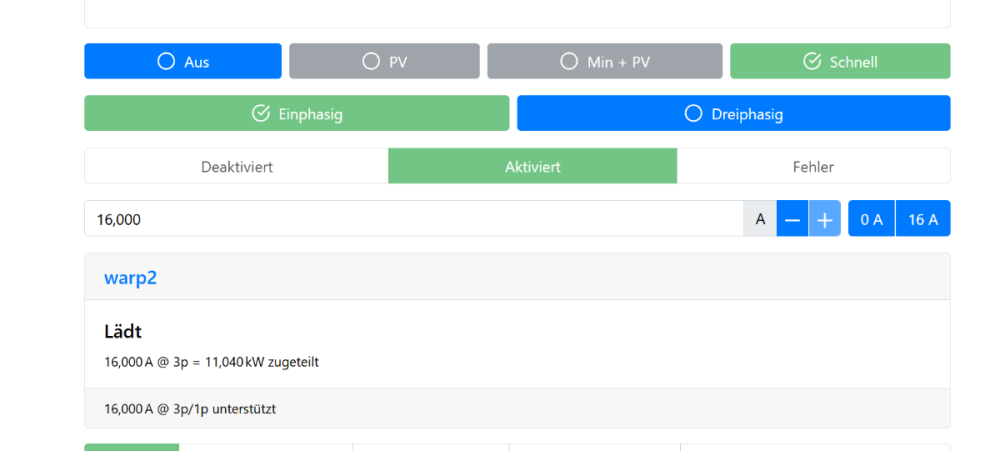
Hallo, ich bin erst seit wenigen Tagen mit einer Warp2 und WEM mit Phasenumschaltung aktiv. Ich habe aber den Eindruck, dass auf der Statusseite vom WEM die Phasenumschaltung immer als 1-phasig (grün) angezeigt wird, auch wenn 3-phasig geschaltet ist. Denn ein manuelles Umschalten auf 3-phasig ändert an den Leistungen nichts (außer einer kurzen Unterbrechung) und erst das manuelle schalten auf 1-phasig reduziert dann die Leistung entsprechend. Bei der aktuellen Firmware 2.3.5 beobachtet. Hier der Screenshot vom WEM, die Warp2 lädt dabei mit 11kW... VG, Cord
-
Cool, Danke, mache ich!
-
Hallo, ich überlege mir eine Batterie SAX Power nachzurüsten und frage mich, ob das mit meinem Setup funktionieren kann bzw. ob es überhaupt schon mal jmd geschafft hat, da zB SunSpec nicht unterstützt wird (aber Modbus/TCP, Dokumentation dazu habe ich von SAX erhalten). Ich kenne mich mit Modbus/TCP leider nicht aus, um das hier einschätzen zu können. Ich messen mit einem Shelly Pro3 EM Bezug und Einspeisung und nutze den WEM um meinen Warp2 mit Phasenumschaltung zu steuern. Ich würde jetzt gerne die Batterie in den WEM integrieren, damit PV-Überschussladen auch mit ladender Batterie gut funktioniert. Danke. VG, Cord
-
Hallo, ich habe mir ein entsprechendes Konto angelegt und kann mich über die Webseite einloggen und das pw ändern. Ein Abspeichern aus dem WEM heraus scheitert aber mit unterschiedlichen Fehlermeldungen: a) sinngemäß mehr als 32Byte: Da ich zunächst ein pw mit UTF8-Sonderzeichen genutzt habe, habe ich versucht, dieses zu verkürzen - kein Erfolg b) selbst nur mit Klein/Großbuchstaben und Ziffern, erhalte ich jetzt: Speichern der Fernzugriffs-Einstellungen fehlgeschlagen. 400(Bad Request) Payload error: Json deserialize error: missing field `uid` at line 1 column 4537 Da scheint der (de)serializer noch einen Bug zu haben (firmware ist 2.2.0+66d08071). Was sind die Kriterien für ein gültiges Passwort? Danke! PS: Die gleichen Zugangsdaten funktionieren von meiner warp2 unter firmware 2.6.6+675aeb32. VG, Cord wem-26K8-Debug-Report-2024-12-25T14-33-41-787.txt
-
Hm, da passt wirklich was nicht. War mir bisher nicht aufgefallen. Danke. Meine anderen wiregard Configs haben das Problem nicht...
-
Hi, ich beobachte spontane Reboots an meiner Warp2 (2.1.2-64394038), die ich mir nicht durch einen äußeren Einfluss erklären kann. Kennt jemand das Problem und ggf. Abhilfe? Danke. Ich habe zwei Debug-Report gesichert, die ich zur Verfügung stellen kann. Es sieht dabei im wesentlichen so aus: 0,493 **** TINKERFORGE WARP2 CHARGER V2.1.2-64394038 **** 0,493 314K RAM SYSTEM 293876 HEAP BYTES FREE 0,504 READY. 0,504 Last reset reason was: Software reset due to exception/panic. 0,926 Mounted data partition. 73728 of 3538944 bytes (2.1 %) used 1,142 WARP2 Charger config version: 2.0.0 1,143 ESP32 Ethernet Brick UID: Yrc 1,776 Had to configure soft AP IP address 1 times. 1,777 Wifi soft AP started 1,777 SSID: warp2 2,732 MAC address: C4:5B:BE:3C:D9:35 2,733 IP address: 10.0.0.1 4,376 Ethernet started 4,377 Ethernet connected 4,389 Ethernet MAC: C4:5B:BE:3C:D9:37, IPv4: 192.168.222.70, Full Duplex, 100 Mbps 4,389 Ethernet got IP address: 192.168.222.70 4,490 Set timezone to Europe/Berlin 4,502 No Real Time Clock 2.0 Bricklet found. Disabling Real Time Clock 2.0 support. 4,791 Found 1 records. First is 1, last is 1 4,805 Last charge record size is 2304 (2304, 0) 5,014 Web interface authentication enabled. 5,165 WireGuard enabled. Waiting for NTP time sync. 5,304 mDNS responder started 5,592 This is warp2 (warp2-Yrc), a WARP2 Charger Pro 22kW 2023-06-19 11:17:28,149 NTP synchronized at 22,376! 2023-06-19 11:17:28,937 Got NTP sync. Connecting to WireGuard peer fritz.box:55413 2023-06-19 11:17:30,011 Wireguard connection established 2023-06-19 11:22:07,634 Wrote last uptime to flash Cord
-
Hallo, ich denke ich habe das gleiche Problem bei meiner Warp2 (V2.0.7-62a1f99c). Sie ist in den letzten 6 Monaten 3x 'tot' gewesen, d.h. kein Laden, kein Verbindung über die Webseite. Nach Aus-/Anschalten ging's sofort. Leider habe ich keine weiteren Daten wie Michael und ich kann auch nicht sagen, ob es erst nach längerer Nicht-Benutzung auftritt. Ich versuche darauf zu achten. VG, Cord