bsc76
Members
-
Benutzer seit
-
Letzter Besuch
-
Hallo zusammen, ich würde gerne wissen, ob ich irgendwie eine alternative PV-Ertragsprognose nutzen kann. Die von forecast.solar ermittelten Werte sind oft leider sehr daneben (bei schlechtem Wetter oft 3-4x zu hoch, bei gutem Wetter dafür oft nur die Hälfte... :( ) Ich nutze im Home Assistant Solcast, was bei exakt gleicher Konfiguration wirklich extrem genaue Prognosen liefert. Kann ich meine WARP3 irgendwie dazu bringen, entweder direkt oder über mein Home Assistant die Solcast-Daten zu nutzen?
-
Wenn du die Batterieentladung während des Schnellladens des Autos unterbinden willst, dann wählst du „Schnellladung aktiv“ als einziges Kriterium und Aktion „Blockieren“.
-
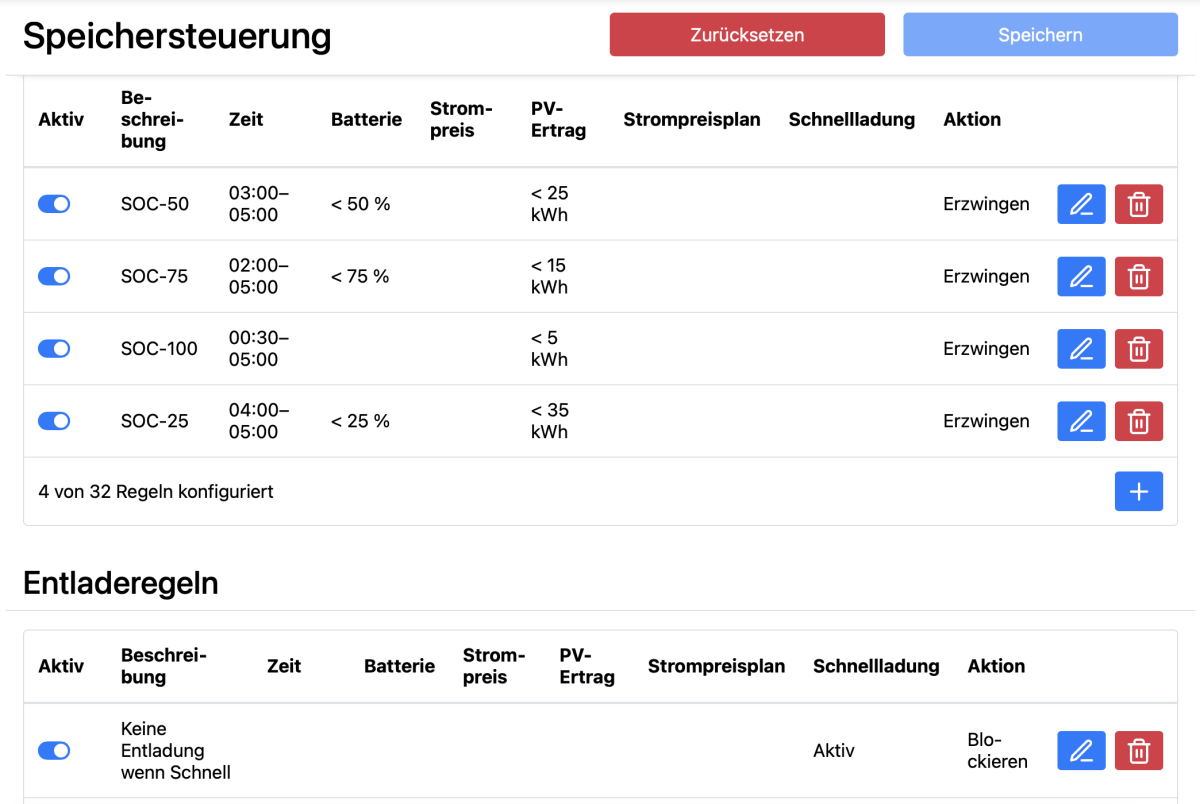
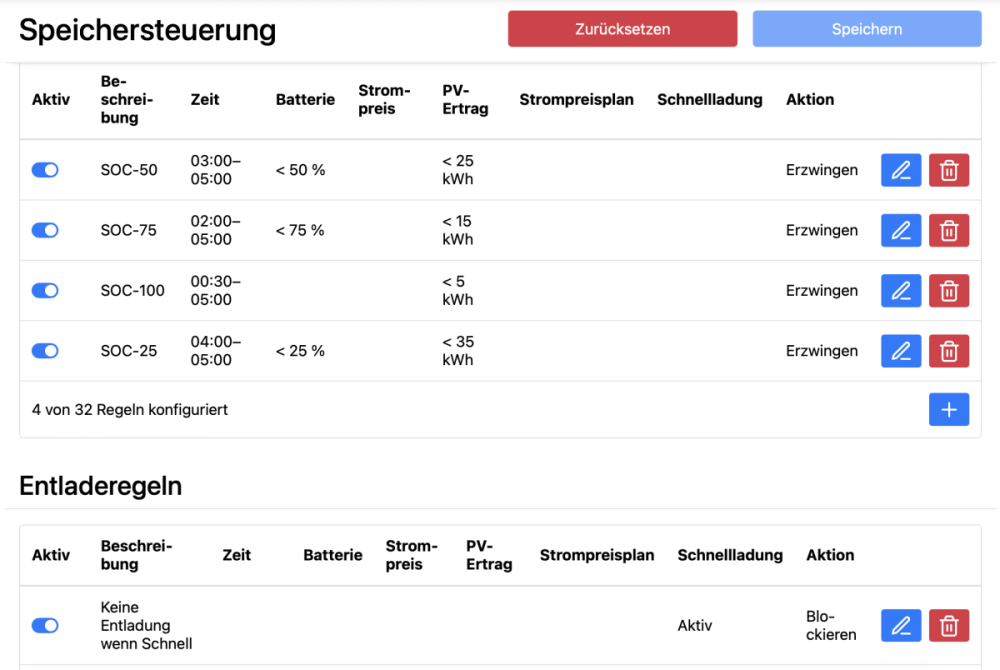
Ich habe eine gestufte Speicherladeregelung. Die letzte Nacht ist wohl einfach die Prognose immer genau am Grenzwert entlang gewandert. Danke, dass du so schnell reingeschaut hast. Wegen der Fehlermeldung muss ich mir also keinen Kopf machen? Oder stimmt irgendwas auf der Seite meines Speichers bzw. des Modbus-Proxies nicht?
-
Hmmm, gerade noch einmal ein paar Rahmendaten gecheckt... kann sein, dass ca. direkt um 4 Uhr die PV Prognose hauchdünn über die 35kWh-Schwelle gesprungen ist. Diesbezüglich also Entwarnung! Bleibt die seltsame Fehlermeldung.
-
Mir ist gerade aufgefallen, dass ich einige Fehlermeldungen im LOG habe. UseCase: Sungrow SH20T mit SBH200 Erzwungenes Batterieladen, Entladen unterbinden. WR und Batterie verhalten sich wie gewünscht. Aber im LOG File kommt dieser Eintrag alle ca. 5 Sekunden: 17:45:35,876 | batteries_mbtcp | Battery 0: Setting mode "force charge, block discharge" failed at 4 of 5: ModbusServerDeviceFailure (4) Irgendeine Idee? Ich kann auch nicht sagen, ob das schon immer so wahr seit ich das Speichermanagement teste. Warum habe ich überhaupt ins Log geschaut? --> Weil heute Nacht eine gewünscht Speicherladung ausgeblieben ist. Ich habe aber nicht herausfinden können, woran es lag. Werde das die nächsten Nächte noch einmal weiter beobachten. Jedenfalls war das LOG voll von diesen Fehlermeldungen, nur das Nachts eben nicht geladen wurde. Ich habe das LOG von heute Morgen einmal mit angehängt. Meine Erwartung wäre gewesen, dass eine Automation greift, die bei PV-Prognose <35kWh und Batteriestand <25% im Zeitfenster 4-5Uhr morgens startet. Der WR war zu der Zeit im StandBy. warp3-2cAi-Debug-Report-2026-01-30T07-14-50-613.txt
-
Danke - das erfüllt aber nicht, was ich mir erhofft hatte. Ist ok. Ich erstelle mir in Home Assistant eine Logik, die mir den Stromverbrauch der Wallbox nach Bezugsquellen und deren Kosten aufschlüsselt. Ist wohl auch zu speziell, um in der allgemeinen Wallbox-Software sinnvoll integriert zu werden. Für jeden, der es vielleicht nachbauen möchte, hier mein Wunsch der Auswertung: Zielgrößen: a) Wallbox-Bezug im günstigen Zeitfenster meines Stromtarifs b) Wallbox-Bezug im teuren Zeitfenster meines Stromtarifs c) Wallbox-Anteil aus PV-Überschuss (nach Abzug aller anderen Hausverbraucher)
-
-
Wäre es denkbar eine Lösung zu schaffen, um den aktuell für die Berechnung zu verwendenden Preis per MQTT zu setzen? Würde vieles vereinfachen und flexibler machen für HT/NT Tarife bzw. den Wechsel zwischen Netz- und PV-Strom. Nur so als "rohen" Gedanken. Vielleicht ist die Idee ja auch murks... 🙃
-
Glaubst du wirklich, dass a) das Balancing des BMS von BYD so grottich ist und b) eine Steuerung über eine Wallbox(!) der richtige Ansatz ist, dies in den Griff zu bekommen? Ich würde hier eher als Spielerei über z.B. Home Assistant Automationen ansetzen, wenn ich meinen würde, hier einen brauchbaren Hebel in der Hand zu haben.
-
Mit der Regel blockiert er das Entladen doch bestimmt auch im PV Modus? Das wird man ja wohl nicht wollen 🙃
-
Das macht Sinn. Scheint auch alles zu funktionieren, genau wie du es beschrieben hast. Danke für die Antworten und die Geduld :-) Die Speichersteuerung (Sungrow SH20T+SBH200) funktioniert übrigens hervorragend. Jetzt fehlt nur noch die Aktivierung meines Octopus Go…
-
Etwas seltsam. Der nächste Versuch nach 30 Minuten schlug auch fehl. 2025-12-28 15:02:27,356 | solar_forecast | HTTP error while downloading solar forecast: 429 2025-12-28 15:02:27,357 | solar_forecast | Solar Forecast rate limit reached, next solar forecast API call will be in 2 hours Aber zwei Stunden später hat es dann geklappt. Werde da mal weiter im Auge behalten.
-
Danke Matze, da hätte ich auch selber drauf kommen können 🫠 warp3-2cAi-Debug-Report-2025-12-28T14-35-12-952.txt
-
Hi zusammen, ich habe mir eben die Beta mit dem Batteriemanagement installiert (großartige Arbeit übrigens!) und jetzt ist mir aufgefallen, dass die Ertragsprognose nicht mehr funktioniert. Die API seitens forecast.solar ist angeblich i.O. Leider kann ich natürlich nicht sagen, ob es vor dem Update auf die Beta noch ging. Sorry. Hat jemand die gleichen Probleme?