




Markus S
Members
-
Benutzer seit
-
Letzter Besuch
-
Hi, wir haben das Problem gefunden. Es lag an einem Switch im Netzwerk, welcher scheinbar die Antwort vom Server geblockt hat. Dies habe ich festgestellt, als der Switch unplanmäßig neugestartet wurde und danach wurde direkt die Verbindung zum Remote Server aufgebaut. Was komisch war, dass dieser Switch nicht der Switch ist in welchem die Wallboxen direkt angeschlossen sind, sondern ein Swtich vor dem Switch. Daher kann dieses Problem als gelöst geschlossen werden. Danke für die großartige Unterstützung. Gruß Markus
-
Eigentlich gab es keine Änderungen am Router (Unifi UDM Pro, komplettes Unifi Netzwerk) welche das Problem erzeugen sollte. ich habe die betoffene Wallbox mal komplett ausgeschaltet, aber selbst nach dem neustart kam keine Verbindung zu stande. Währen des Test hatte ich auch die Remote Verbindung bei der anderen Wallbox deaktiviert, aber trotzdem kein Erfolg. Die andere Wallbox verbindet sich beim einschalten der Remote Verbindung direkt wieder mit dem Server. Es gibt eigentlich auch nur wenige Unterschiede der Wallboxen. Meine (die funktionierende) Wallbox wird über eine gesponserte EVCC Instantz gesteuert und ist per MQTT mit Home Assistant verbunden. Die andere wird über eine nicht gesponsorte EVCC Instanz gesteuert. Alles andere ist gleich. Meine Schwetster nutzt die Wallbox für ihren Firmenwagen und nutzte den E-Mail Versand des Ladetrackers, welcher auch nicht funktioniert, ich gehe davon aus, dass hier auch die Remoteverbindung genutzt wird. Danke und Gruß Markus warp3-2cCw-Debug-report-2026-07-18T03-55-13-583.txt
-
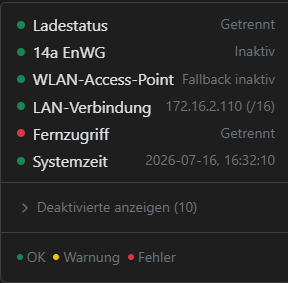
Hallo, ja leider besteht das Problem immer noch. ICh habe die Software auch schon neugestartet, ohne Erfolg. Ein komplettes Ausschalten sollte ja den gleichen Effekt haben, wie ein Neustart über die Webseite, oder? Gruß Markus
-
Hallo, wir haben zwei Warp 3 Pro Wallboxen. Bei einer funktioniert der Fernzugriff ohne Probleme, aber bei der zweiten hat er auf gehört zu funktionieren. Die beiden Wallboxen sind im gleichen Netzwerk, aber jeweils in ihrem eigenen Stromkreis. Beide haben die gleiche Verfsion 2.12.1+6a4f9137 Die Logeinträge zeigen nur diese Meldung: 2026-07-15 04:55:05,650 | remote_access | Connecting to Management WireGuard peer my.warp-charger.com:51820 2026-07-15 04:56:06,261 | remote_access | Management connection timed out 2026-07-15 04:56:09,552 | remote_access | Connecting to Management WireGuard peer my.warp-charger.com:51820 Die my.warp-charger.com zeigt auch Statusänderungen der Wallbox an, also es kommen Infos zur Webseite, aber es kommt keine Verbindung zu stande. Wir haben zwei Accounts, bei meinem Account habe ich mal die betroffene Wallnbox auch hinzugefügt, aber auch dort funktioniert es nicht, Vielen Dank für eure Unterstützung. Markus warp3-2cHk-Debug-Report-2026-07-15T05-00-46-395.txt