yvo
Members
-
Benutzer seit
-
Letzter Besuch
-
Dear List The problem with the shutdown is in rare cases still existing. But I have the impression, that the source of the problem could be located differently: I made the observation, that the relay used for the final power-cut is not reacting properly. The relay gets stuck in the ON-position and is not switching into the OFF-position. Does someone made a similar observation about the behavior of the Industrial Dual Relais? Looking forward to any hints. Cheers, Yvo
-
Dear List I am using Bricks and Bricklets in distributed hardware in many remote locations. Usually, the bricklets are accessed by software running locally at the remote locations. What is missing from my side, is a monitoring-tool, which checks the availability and health of the individual bricklets at the locations. To have an information about the health and availability of the bricks and bricklets, I am thinking to implement a piece of software running as service, e.g. TinkerforgeWatcher. The TinkerforgeWatcher will have a configuration-file containing a list of all bricks and bricklets to be monitor at the specific location. Using a monitoring-service, like Prometheus, the TinkerforgeWatcher will submit in a defined rate the health of all bricklets. Basically, it will submit an OK or a NOK for each bricklet. Now the question: What kind of function would you use to check the health of a bricklet? Currently, I have the impression, that *.get_spitfp_error_count() would be the most suitable function to have a first impression about the health of a bricklet. Looking forward to any suggestions. Cheers. Yvo
-
Dear list I am using successfully IMU-Bricklets 3.0 mounted on constantly rotating devices. Principally, it works very good. Using the function get_quaternion(), I am calculating the rotations of the bricklet. But I made the following observation: It looks like a delay of the measurement returned from the bricklet and the rotation made by the rotating device. Question: Is it possible to increase the update-rate of the sensor to get timely correct measurements? I just realized, that the function BrickletIMUV3.set_sensor_configuration(magnetometer_rate, gyroscope_range, gyroscope_bandwidth, accelerometer_range, accelerometer_bandwidth) exists. The usage of the bricklet is limited to the measurements of the quaternions. Question: Which parameter of the sensor-configuration do I have to improve / to increase? Looking forward to any hints and advises. Cheers, Yvo
-
Topp. Vielen dank, alles verstanden.
-
Hallo Unity Ich habe eine Anfängerfrage zum "Industrial Dual AC Relay Bricklet": Bei geöffnetem Relais messe ich rund 100V am wegführenden Kabel. Bei geschlossenem Relais messe ich 230V am wegführenden Kabel. Müsste bei geöffnetem Relais nicht 0V am wegführenden Kabel anliegen? Freue mich auf jeden Hinweis. Cheers. Yvo
-
Ahhhhhhhhhhhh. Das war das Problem. Aus Routine habe ich Pin-5 auf dem linken Pin und GND auf dem rechten Pin angeschlossen. Hier aber gerade umgekehrt ... Super, jetzt geht's. Vielen Dank.
-
Hallo zusammen Mit einem Industrial Dual 0-20mA Bricklet 2.0 nutze ich einen Sensor vom Type 3. Den Sensor kann über ein weiteres Kabel (Pin-5) und GND auf einen neuen Nullpunkt gesetzt werden. Dazu muss der Pin-5 für >=1s mit GND verbunden werden. Um den Nullpunkt des Sensors immer wieder setzten zu können, habe ich ein Relais eingebaut. Mit diesem kann ich ganz easy via einen Monoflop mit 1500ms den Nullpunkt setzten. Mit dem Industrial-Quad-Relais geht das nicht. Mit dem Industrial-Dual-Relais geht das problemlos. Frage: Ist das Verhalten im Unterschied zwischen einem SolidState-Relais und einem mechanischen Relais begründet? Freue mich auf allfällige Rückmeldung um den Unterschied zu lernen und zu verstehen. Cheers. Yvo
-
@rtrbt great. Worked perfectly. Thank you very mch for the description and help. Cheers, Yvo
-
Dear list I have two or three ESP32 Ethernet Brick's which I should reset to the original factory-settings. The reason for it is, that the bricks are not able to get connected to the LAN anymore. The documentation describes, that the USB-connection is only used as power source and to perform a factory reset on the Brick. And that in contrast to other Bricks, an ESP32 Brick connected to USB will not show up as Brick in a Brick Viewer connected to localhost. But I wasn't able to find a description, how to run a Factory-Reset, either on tinkerforge.de or tinkerunity.org. Question: Could someone guide me to the description of the Factory-Reset for an ESP32 Ethernet Brick? Or adding a short description here? Looking forward to any hints. Cheers, Yvo
-
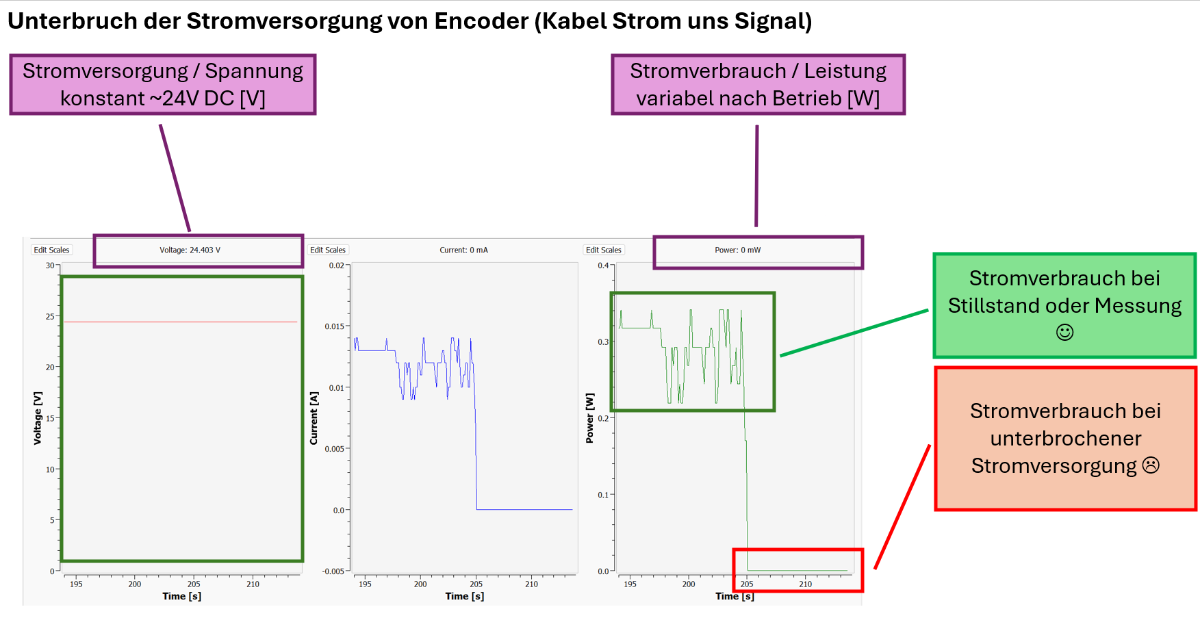
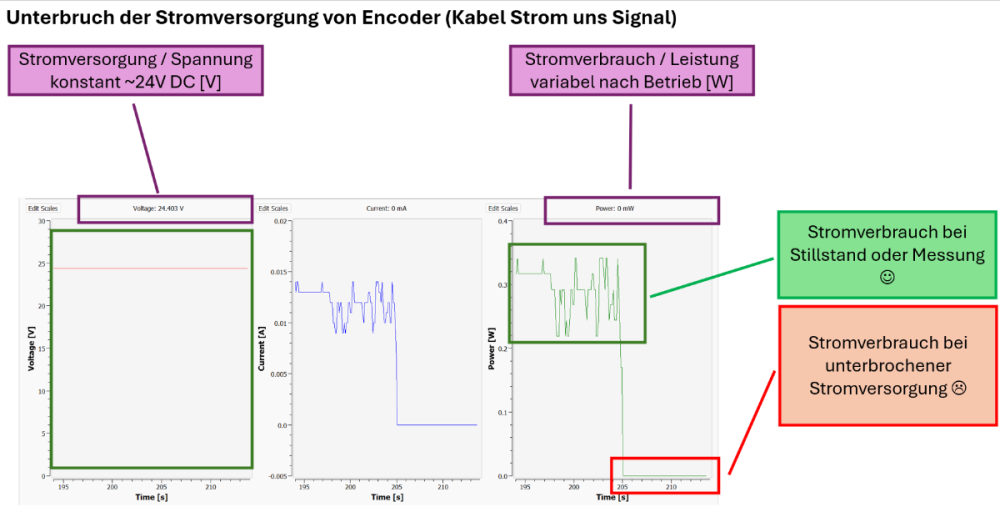
I just tested the Current/Voltage-Bricklet in combination with the sensor: Just works perfectly. The resolution and the minimal value of the bricklet allows the monitoring of the sensor. Cheers. Yvo
-
Great. Thank you very much for the fast replay. I am able to test it next Tuesday when I am at fieldwork. I will let you know, how it worked.
-
Dear list I have to monitor a sensor which consumes <=30mA if it works or not (e.g. disconnected cable). My amateur-approach would be, to add a Voltage/Current-bricklet between the PowerSupply and the sensor to check, if there is power-consumption by the sensor. The fact-sheet of the sensor to be monitored tells me "Power consumption max. without load ≤ 30 mA". The sensor is connected to a 24V PowerSupply. I tried to understand the fact-sheet of the INA226 used by the Voltage/Current-Bricklet. But I wasn't able to understand, if the above mentioned ≤ 30 mA can be measured. Question: What is your opinion? Is it feasible to measure such small power-consumption by the Voltage/Current-Bricklet? Looking forward to any ideas and hints. Cheers. Yvo
-
Hi borg Good point. I added the proposed delay between the call of the monoflop and the call to shutdown the RPi. In the meantime, I set up a test-bed running a continuous start- and shutdown-procedure. During the procedure, an external simulates the main-switch hit by the user for on and off. Turning on, the RPi starts automatically and the backup-power-service gets activated. Turning off, the RPi starts the shutdown-procedure with the final power-cut. One of this cycle takes about 60 seconds. And the setup was now running for almost 20 hours without one failure (about 1'200 sequences). That is great. I will go with this setup into the real-world during the next two days. I will keep you informed, how it works. Cheers. Yvo
-
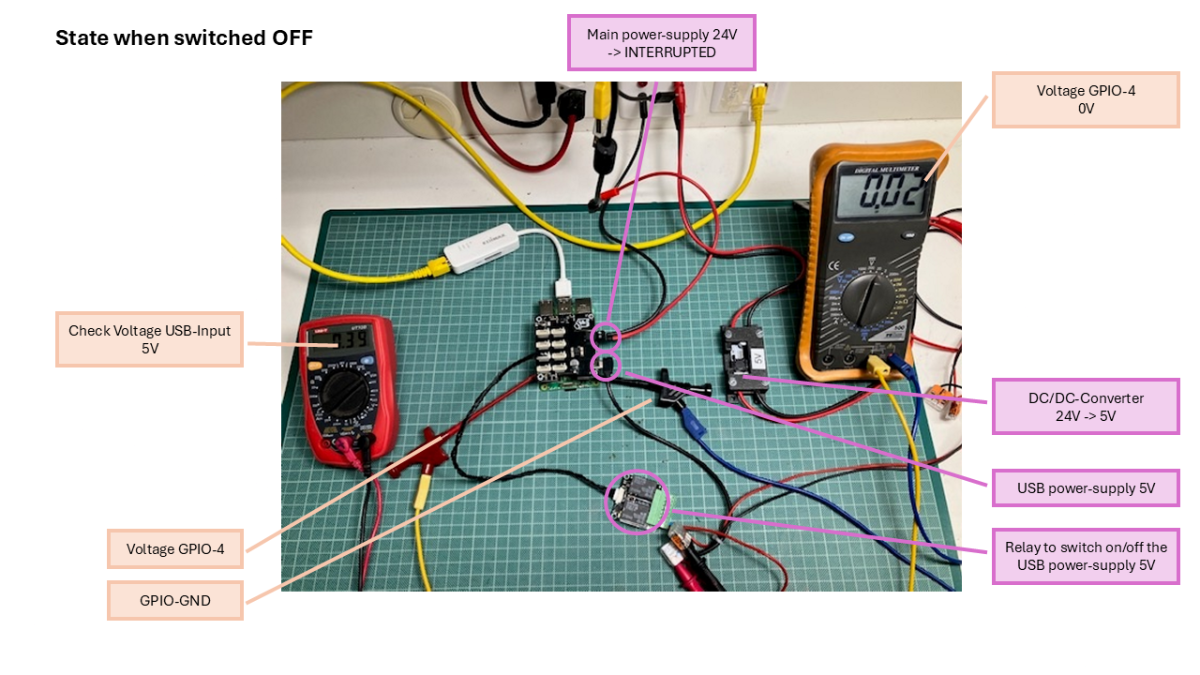
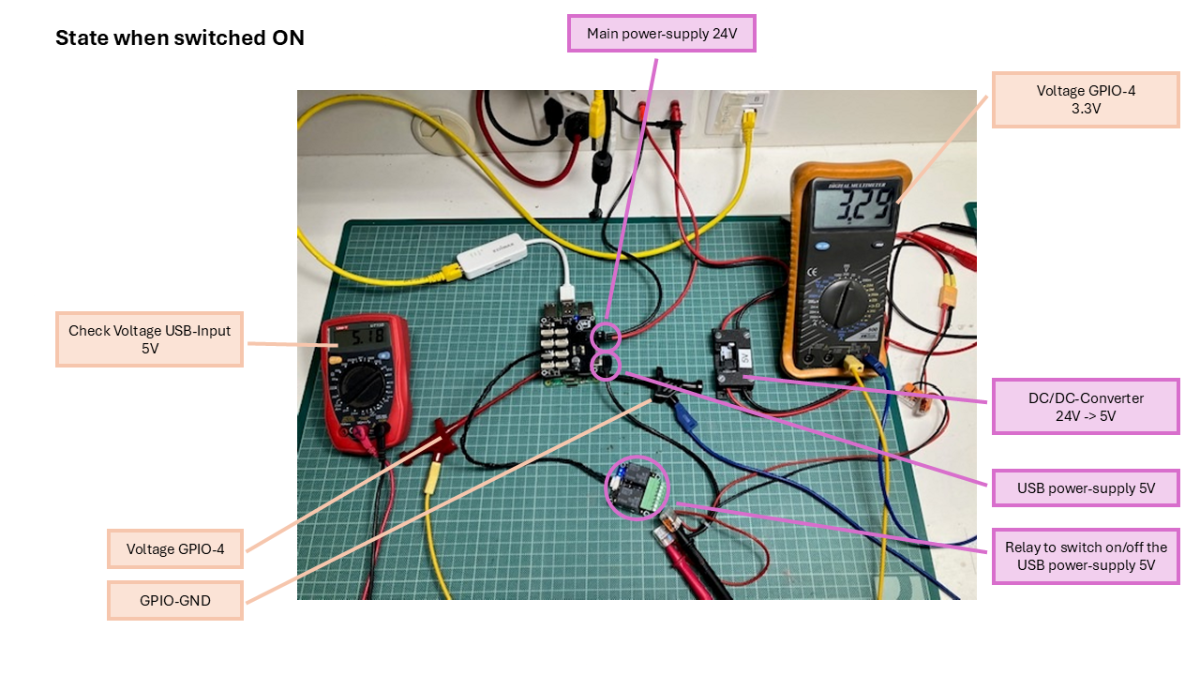
Hi @borg Hi @MatzeTF I was building a lab-setup of the RPi-5-, HAT- and IndustrialDualRelay-setup to simulate the shutdown- and power-cut-procedure. Attached two pictures of the setup. At first, I try to describe the duty of the setup used as a real-world-application: The user switches the setup ON by providing 24V power-supply to the HAT. The RPi starts. A services starts in the background and switches on the IndustrialRelay to provide the HAT with an additional power-supply by USB. The setup has now two power-sources: 24V main-supply, 5V USB-supply. The setup is getting the designated job done autonomously. The user switches the setup OFF by interrupting the 24V power-supply of the HAT. The setup is still powered by the USB-power-supply. The initially started and still running service detects the missing main-power-supply of the HAT (calling hat.get_voltages() in an endless loop). The services initiates the shutdown-procedure using the following code: def shutdown(self): ''' The function is called, as soon as the value of the voltage_dc of the HAT goes to 0.0V (user switched main-switch to OFF). The function guarantees a proper shutdown of the system and a final power-cut of all bricklets and HAT. ''' ''' Maximum of the power-off period of the HAT (about 130 years). See documentation. Guarantees a period long enough to be disabled. Due to the hard power-cut, at each restart, the unit starts anyway. ''' powerOffDuration = 2**32-1 ''' The delay in seconds till the hardware turns off. ''' delay = 10 ''' Initiate the hard power-cut of the HAT with the given delay in seconds to shutdown the system properly. ''' self._hat.set_sleep_mode(delay, powerOffDuration, True, True, False) ''' Turns the USB-power-supply off with the given delay in milliseconds. ''' self._dualRelais.set_monoflop(0, True, delay * 1_000) ''' Initiating the shutdown of the system of the RPi. Using a delay of 10 seconds of the hardware-based power-cut is enough to let the system properly running a shutdown. Important remarks: * Even if the RPi is shutdown, the HAT will perform the final power-cut. ''' os.system("sudo shutdown now") During the experiment with the lab-setup, the GPIO-4 stays always at 3.3V (high). It only goes low, when the two power-supplies are cut. Question: What is your suggestion? This code and setup should guarantee a bullet-proof way to disconnect the setup from the USB-power-supply? Is there an issue with the GPIO-4 staying high? And should it set to low before calling sudo shutdown now for the proper shutdown of the system? Looking forward to any suggestions and hints. Cheers. Yvo
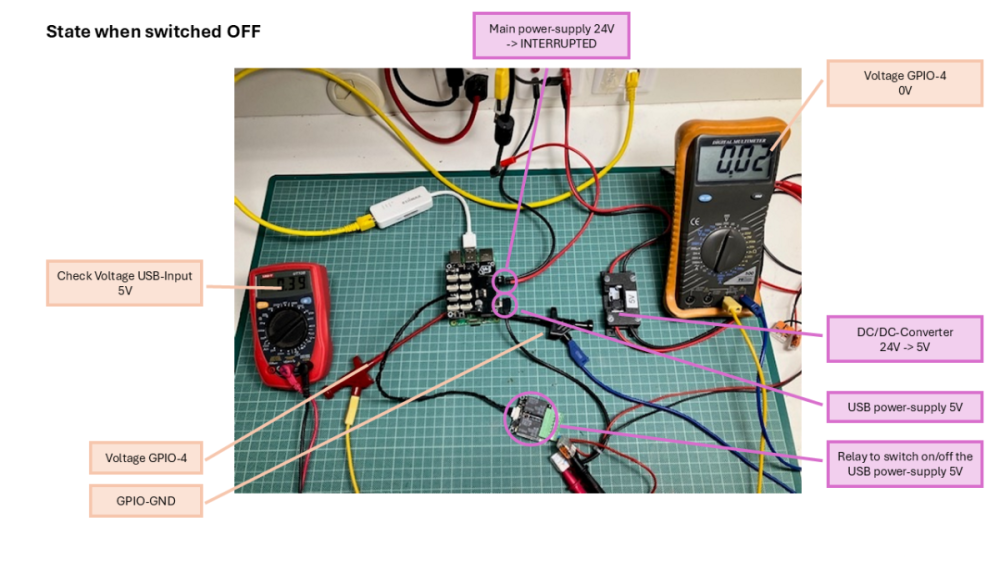
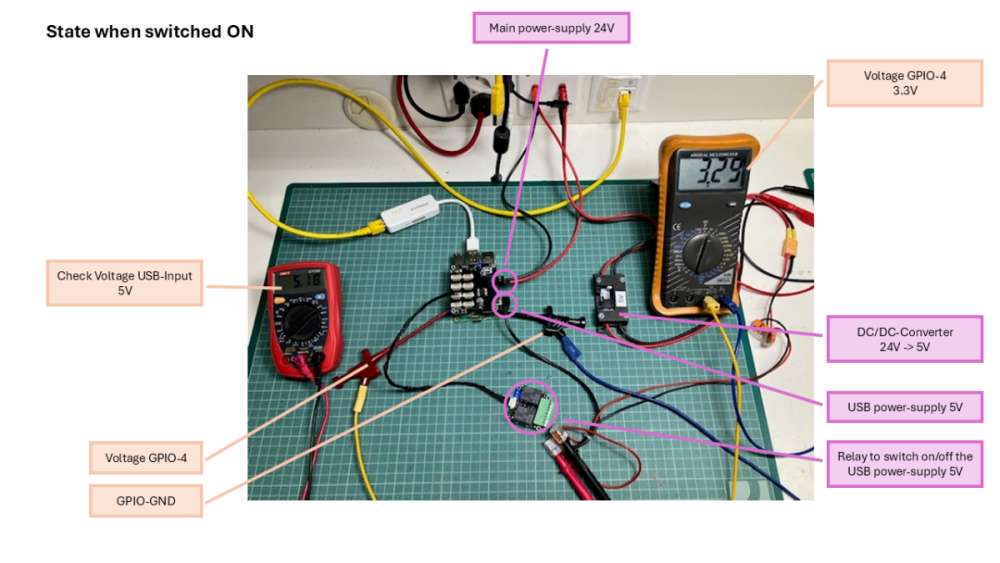
-
Hi borg Puh, your questions are fare to deep into the technical details for my limited knowledge. I just found some hints, that this behavior of GPIO-4 is a main difference between RPi4 and RPi5. I have the same shutdown-procedure running on many RPi4 (8 pieces) with the same setup and the same software, but not encountering this behavior. Strange enough, even the behavior of the 8 RPi5 is not consequently the same. I was able to get the GPIO-4 to low (0V) using the call as you mentioned. But short after the shutdown ended, the GPIO-4 goes back to high (3.3V).