



Jump to content
View in the app

A better way to browse. Learn more.

Tinkerunity

A full-screen app on your home screen with push notifications, badges and more.

To install this app on iOS and iPadOS
  1. Tap the Share icon in Safari
  2. Scroll the menu and tap Add to Home Screen.
  3. Tap Add in the top-right corner.
To install this app on Android
  1. Tap the 3-dot menu (⋮) in the top-right corner of the browser.
  2. Tap Add to Home screen or Install app.
  3. Confirm by tapping Install.

Nico201

Members
  • Benutzer seit

  • Letzter Besuch

Alle erstellten Inhalte von Nico201

  1. Danke, funktioniert super.
  2. Windows 8 Enterprise x64.
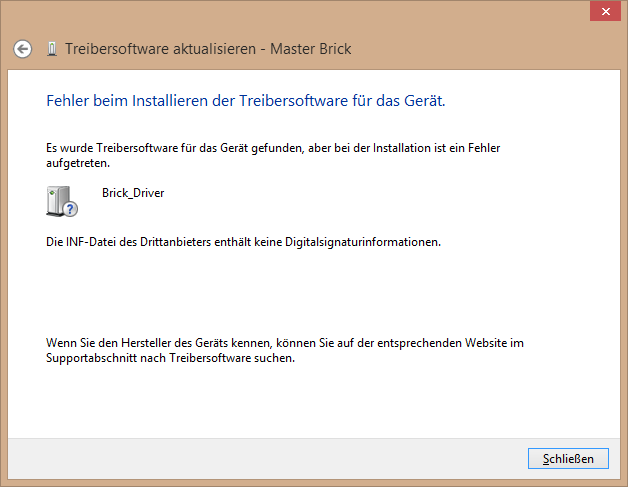
  3. Hallo, ich habe gerade versucht, den MasterBrick auf Windows 8 zum Laufen zu bekommen. Das Gerät wird im Gerätemanager ordnungsgemäß erkannt. Nachdem ich manuell den Treiberordner von BrickD ausgewählt habe, findet er den Brick_Driver. Allerdings kann dieser aus folgendem Grund nicht installiert werden: "Die INF-Datei des Drittanbieters enthält keine Signaturinformationen." Kann der Brick mit Windows 8 verwendet werden? Wie kann ich den Treiber installieren? Der BrickViewer erkennt keine Bricks. Nico
Configure browser push notifications

Chrome (Android)
  1. Tap the lock icon next to the address bar.
  2. Tap Permissions → Notifications.
  3. Adjust your preference.
Chrome (Desktop)
  1. Click the padlock icon in the address bar.
  2. Select Site settings.
  3. Find Notifications and adjust your preference.