empunkt
Members
-
Benutzer seit
-
Letzter Besuch
-
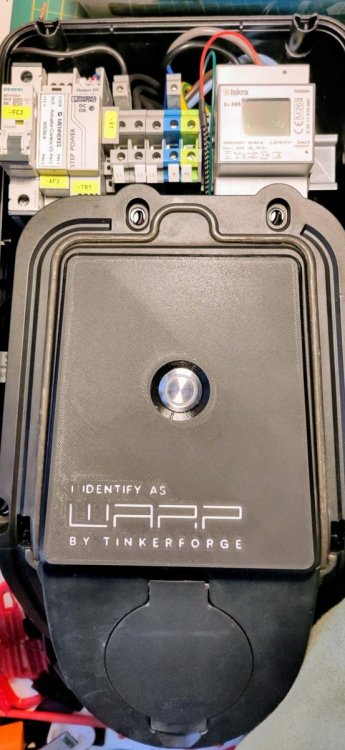
Moin, hier wie angekündigt eine kurze Zusammenfassung, wie ich das umgesetzt habe. Der Code ist über drei Repos verteilt hier zu finden: https://github.com/nevesenin/evse-v2-bricklet/tree/plug-lock https://github.com/nevesenin/esp32-firmware/tree/plug-lock https://github.com/nevesenin/generators/tree/plug-lock Ich beschreibe hier ausdrücklich nur den Aufbau mit einem Mennekes Aktuator-Steuermodul an einem seperaten 12-V-Netzteil. HardwareTeil Funktion Mennekes Aktuator-Steuermodul (Actuator-Control V3, 30539-A) betreibt den Verriegelungsmotor Seperates 12-V-DC-Netzteil versorgt ausschließlich die Verriegelung Industrial Quad Relay Bricklet 2.1 schaltet die Versorgung des Steuermoduls und die Prüfschleife Industrial Dual Analog In Bricklet 2.1 liest das LOCK-Signal und die Prüfschleife Das seperate 12-V-Netzteil ist zwingend erforderlich. Das ist keine Empfehlung, sondern die Voraussetzung, unter der der gesamte Aufbau beschrieben ist. Das Steuermodul hat zwei Klemmenblöcke. Der Motor hängt an einem, der andere ist beschriftet mit: LOCK OUT- +12V PSU+ und PSU- liegen am Netzteil, nicht am Modul. VerdrahtungVon Nach PSU+ +12V am Steuerblock OUT- Quad Relay Kanal 0 DC+ Quad Relay Kanal 0 DC- PSU- LOCK Dual Analog In Kanal 0 IN+ OUT- Dual Analog In Kanal 0 IN− PSU+ Quad Relay Kanal 1 DC+ Quad Relay Kanal 1 DC− Dual Analog In Kanal 1 IN+ PSU- Dual Analog In Kanal 1 IN− Kanal 0 des Relais schaltet also die Versorgung des Moduls auf der Minusseite und führt dabei den Motorstrom. Es ist kein stromloser Signalkontakt. Unnbedingt die Polarität beachten. DC+ muss zu PSU+. Falschherum wirkt der Kanal dauerhaft geschlossen, und die Prüfschleife gilt als verifiziert, ohne dass das Relais je geschaltet hätte. Das LOCK-SignalLOCK ist die Rückmeldung des Steuermoduls. Die Schwellenwerte in der Implementierung, die am Ende entscheiden, ob der Input Kanal "offen" oder "geschlossen" meldet, sind mit dem oben beschriebenen Aufbau und mit genau dieser Hardware ermittelt. Ob die Werte mit anderer Hardware genau so funktionieren, kann ich nicht beurteilen. Außerdem ist LOCK ein Logikausgang hinter einem sehr großen Vorwiderstand — genau diesen Punkt musste ich mir erklären lassen, da ich nicht verstanden habe, warum das Industrial Digital In 4 Bricklet nicht funktioniert hat. TL;DR Der optogekoppelte Eingang braucht 2,3mA, die LOCK nicht bereitstellen kann. Deshalb sitzt hier jetzt, anders als ursprünglich geplant, ein Industrial Dual Analog In, weil der die Spannung messen kann. Messwerte am Kanal 0 des Analog In BrickletsReferenzwerte bei 12,117 V am +12V Anschluss. Messwerte über die API ermittelt. Zustand Messwert entriegelt 4010 mV verriegelt 7217 mV verriegelt, während eines Prüfschleifen-Tests 5596 mV Ein entriegelter Stecker liest nicht 0 mV. 4010 und 5596 sind in diesem Fall die Schwellenwerte die in modules/plug_lock_input/plug_lock_input.h eingetragen sind. Diese Werte unbedingt durch Messungen ermitteln — falsche Werte könnten eine Verriegelung melden, die es nicht gibt. Die PrüfschleifeKanal 1 beider Bricklets bildet eine zweite Schleife über das Verriegelungsnetzteil. Sie existiert, damit die Wallbox sich sicher sein kann, dass genau diese beiden Bricklets miteinander und mit dem Verriegelungsnetzteil verdrahtet sind — die reine Geräteerkennung sagt nur, dass irgendein Quad Relay angesteckt ist. Die Firmware öffnet die Prüfschleife alle 15 Minuten kurz und erwartet, dass der Messwert folgt. Tut er das nicht, ist die Schleife gebrückt statt geschaltet und die Firmware meldet einen Fehler. Aktivieren im WebinterfaceEin Menüpunkt Wallbox → Steckerverriegelung wird sichtbar sobald beide erforderlichen Bricklets gefunden wurden und die Prüfschleife die Kopplung beider Bricklets verifiziert hat. Alle Verbindungen aus wie oben unter Verdrahtung beschrieben herstellen. Wallbox einschalten, im Webinterface auf die Seite Wallbox → Steckerverriegelung gehen und die Hinweise sorgfältig lesen. Um zu verhindern, dass die Verriegelung versehentlich deaktiviert wird und der Stecker unter Last gezogen werden kann, lässt sie sich nicht einfach wieder ausschalten. Dazu müssen beide Bricklets im spannungsfreien Gehäuse abgezogen werden. Eine unterbrochene Prüfschleife reicht dafür bewusst nicht aus: ein Ausfall des Verriegelungsnetzteils würde den selben Zustand erzeugen, ist aber ein Fehlerfall. Wenn die Wallbox danach wieder hochgefahren ist, lässt sich die Verriegelung im Webinterface deaktivieren. Der Menüpunkt Wallbox → Steckerverriegelung verschwindet dann wieder. TestsJo, die gibt es. Ohne fand ich dann doch zu mutig. Im oben verlinkten esp32-firmware Repo unter software/src/modules/plug_lock/tests/plug_lock_safety.py. Mit ein paar Schaltern und einem Wallboxtester können so ein paar Fälle durchgespielt werden. ButtonUm den Button unterzubringen, musste ich eine neue Frontplatte drucken und habe die Gelegenheit genutzt, um gleich mal was richtig zu stellen. ;)
-
Moin, kurzes Update: Das funktioniert tatsächlich grundsätzlich. Ich musste unterwegs nur feststellen, dass ich von Elektronik nicht so viel Ahnung habe, wie ich mir gerne einbilde. Ich hoffe, dass ich am Wochenende das einmal komplett durchgetestet bekomme. Dann würde ich die Behauptung, dass es funktioniert, auch mit harten Fakten belegen können. Wenn's soweit ist, schreibe ich hier nochmal ne kurze Zusammenfassung.
-
Ok, vielen Dank. Das reicht mir als Bestätigung. Ich wollte nur sicherstellen, dass ich da nicht irgendetwas fundamentales übersehen habe. Wegen der freien Ports kam ich überhaupt erst drauf.
-
Moin, ginge das theoretisch auch, das über ein Digital IO und ein Relay Bricklet umzusetzen? Ich hab eine alte Wallbox, in der die Steuerung der Verriegelung und 12V Versorgung drin ist und irgendwie Bock das auszuprobieren, falls das nicht 'ne komplett bescheuerte Idee ist. Das kann ich leider noch nicht beurteilen, weil ich gerade erst auf die WARP4 und das ganze Drumherum aufmerksam geworden bin.