sj087
Members
-
Benutzer seit
-
Letzter Besuch
Alle erstellten Inhalte von sj087
-
Super, dann lass ich mal das Update laufen und schaue im nächsten Monat. Dankeschön
-
Hallo, ich habe den automatischen Versand für den Ladelog eingerichtet. Dieser sollte ja am 01. des Monats versendet werden. Leider ist meiner von September stand jetzt immer noch nicht versendet und in dem Info Feld - "nächster Versand" steht weiterhin 01.10.2026 drin. Der Fernzugriff ist eingerichtet und auch der Testversand funktioniert tadellos. Nur wird der Log nicht automatisch versendet. Woran könnte das liegen? Und als kleine Anregung - es wäre super wenn man ohne einen weiteren Fernzugriffsbenutzer eine weitere Mailadresse angeben könnte - z.B. eine CC . Damit der Ladelog direkt an den Arbeitgeber versendet wird. Danke und viele Grüße Steffen
-
Funktioniert, kann also geschlossen werden. Danke!
-
Super, danke ich werde testen wenn später die Sonne scheint
-
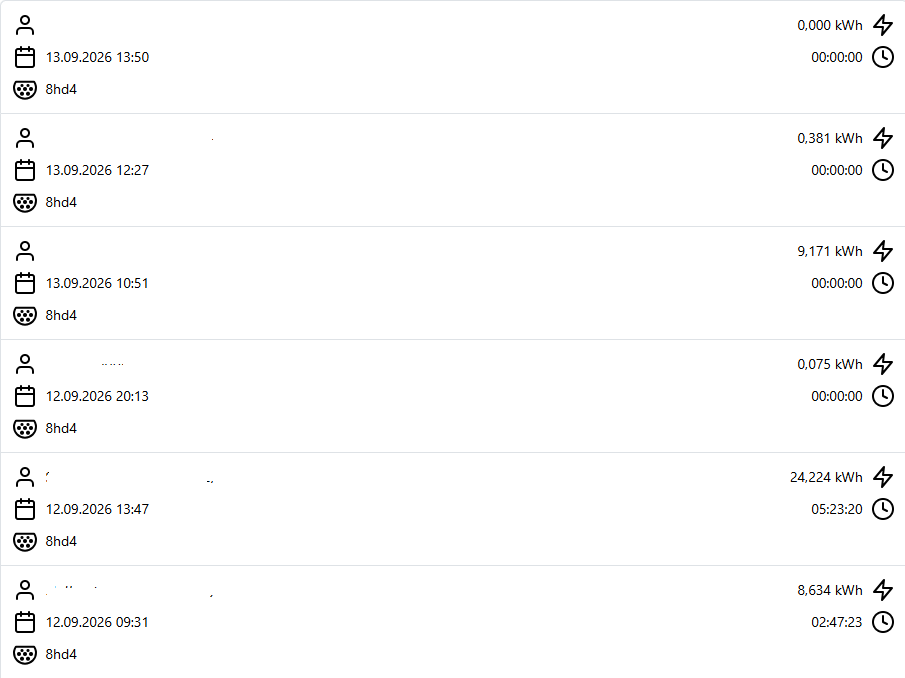
So eben nochmal angesteckt um kurz nach 15 Uhr. Dann lief die Zeit in der Weboberfläche sauber mit. Das Auto hat dann seinen Zielladestand erreicht und die Ladung beendet. Jetzt steht im Tracker aber wieder 0 Minuten. Obwohl die Zeit ordentlich mitgezählt hat während des Ladevorgangs. Mich macht das Checksum Mismatch etwas stutzig. Gibt es Ideen? Danke schonmalwarp4-8hd4-Debug-Report-2026-09-15T18-05-38-316.txt
-
warp4-8hd4-Debug-Report-2026-09-14T15-56-21-883.txt
-
Hallo, ich habe seit Freitag mein Auto um endlich auch die Warp4 einzuweihen. Soweit hat auch alles geklappt. Jetzt habe ich nur folgende Sache: Im Ladetracker / Ladelog wird zwar die Energiemenge und auch der Start erfasst, aber die Ladedauer bleibt auf 0 stehen. Den ersten Ladevorgang hat es noch die Zeit angezeigt, jetzt nicht mehr. Das ganze sieht natürlich dann auch im Ladelog den ich als PDF meinem Arbeitgeber geben soll komisch und nicht richtig aus. Woran könnte das liegen? Danke und Grüße