




neomutant
-
Benutzer seit
-
Letzter Besuch
Posts erstellt von neomutant
-
-
-
oscilation 1-3mbar is normal for this sensor? I have test it 5 minutes outside its fast sinusoid bechavior, going up and down +-20-30m.
-
Again, we use the same algorithm. The link you posted is even in our documentation: http://www.tinkerforge.com/en/doc/Hardware/Bricks/IMU_Brick.html#how-it-works .
sorry did't get that first time.
-
so this is just a trick ? thought that You move sensor up and down to graph was not a flat line. But anyway in this image it look more solid (Altitude values).
http://www.tinkerforge.com/en/doc/_images/Bricklets/bricklet_barometer_brickv.jpg
-
x-IMU code is open source. So if u have some time for try to implement in TF IMU and test it how its work i will be more then happy

https://code.google.com/p/imumargalgorithm30042010sohm/downloads/list
-
-
-
"its way more faster" i meant that in current version TF Imu transmit data to slow over Wi-Fi extension to be able to use it. I have try use it in head tracking application for use in computer game "Euro Truck Simulator 2". Its work ok over USB. I will try re calibrate Imu when i will have free time, but first i have to read how to accomplish that.
-
But if you know something about how to improve IMU algorithms, I'm sure Tinkerforge will appreciate your help on that subject.
If I knew how, it would long ago did.
Sure impressive, but that IMU also costs 3 times more than the Tinkerforge IMU. I don't think you can expect the same performance from both...
If its good then even at 3x price of TF IMU there is a market for it, u can take my word for it. If it will be on stock, the price is not a problem, for me 1.6m diameter spinning Rc heli blades at 2200 rpm is question of safety me and others in rage, and safety of expensive payload. TF have bright and shiny future, and i hope that they will be the best on the market, but they still have a lot of work to do.
-
Just make test outside, same odd behavior but more difference +-20meters random oscillations.
-
Look on this IMU (its way more faster, and accurate on wireless then Tinkerforge IMU over USB) http://www.x-io.co.uk/x-imu-demos/ and watch first movie, its working exceptionally well
Using this IMU to log walking path
This open source project implements Madgwick’s AHRS and IMU algorithms in C# and demonstrates their real-time performance alongside the x-IMU‘s own propriety algorithm. The source code also includes Madgwick’s implementation of Robert Mayhony’s so called ‘DCM filter‘ in quaternion form.Maybe it will be an inspiration to improve Tinkerforge products.
-
Barometer bricket did not move an inch testing was in house with closed windows and doors, but its shows like he move almost 2m and "moving up and down" all the time. Showing that way soon after purchase and now after the latest firmware update. What can I do to make it fix?

-
//EDIT
Yes. I will try to Update all my brick-s and brickets to new protocol, and try again. Its look like to me that gyroscope sensor used in IMU feeds to much error in sensor data to Kalman Filter algorithm.
-
But if "On device programming" will be possible then ?
Q2: is it possible to change onboard algorithm to be less sluggish, and more acurate ?
even if i use callbacks, imu.SetQuaternionPeriod(2); and try diffident value for SetConvergenceSpeed its still can by only only as toy not a tool, but i truly hope that will change in future.
-
Hi, Is it possible that IMU brick can work faster and be more precise without or with hardware upgrade?
Exsample IMU brick use like a gyro in RcHeli where real gyro have to:
- read data from sensors
- calculate how much is have to change rudder servo using PWM
- Send signal to servo
all things in rate 760 µs
same in auto stabilization, but for all 3axis.
-
No worries, we just splitted the On Device Programming thread, since it degraded to a discussion about a "Linux Brick" (that can handle real Java/Python with standard library etc).
I agree that a Super Master is no viable anymore when there are Linux boards for 35€ available.
My Question is speed and delay ? If it works on linux board via USB the max speed is 1ms and that is not fast enough (exsample PWM reader for rc receiver, or DMX controll for controlling some light and strobe efects, or auto stabilisation systems ).
But, If it work on Super Master with high level language (and I assume that internal delay/speed between Bricks and bricket its lower/faster ) then more things are possibile for Tinkers.
-
both GPS units must be reading position synchronously to make DGPS possible.
I Dont know it will be possible synchronize them programmatically at my end. "And if" maintaining the same reading rate.
the second thing is an investment in the additional modules transceiver transmits GPS corrections.
-
Very interesting idea, but what I dont understand how you will get a very precise position for stack A at first ?
This is question to "LIS expert" (ang. Land Information System) they know how to do it very precise. I will ask my frend he is LIS Expert/Map Creator.
I would do it by averaged data from the GPS position for period of time (like 30 min). and somehow transfer it to MasterBrick which controlling DGPS.
-
http://en.wikipedia.org/wiki/Differential_GPS
Idea is to make one Stack "A" (Masterbrick+Gps+WiFiExt Used as static ground base station where exact 3Dposition is known) comunicate with another stack "B"(Masterbrick+Gps+WiFiExt on moving object)
Stack "A" have known GpsPosition and read Gps position and subtract it with Known position = "correction vector" then sending differential correction information to Stack B GPS using WI-FiExt."Correction vector" Will change over time.
it's possible to get this way around a centimeter precision GPS.
Can Brick Creators/Masters make it native in firmware?
Why GPS is not accurate:
quote from wiki:
When GPS was first being put into service, the US military was concerned about the possibility of enemy forces using the globally available GPS signals to guide their own weapon systems. Originally, the government thought the "coarse acquisition" (C/A) signal would only give about 100 meter accuracy, but with improved receiver designs, the actual accuracy was 20 to 30 meters.[2] Starting in March 1990,[3] to avoid providing such unexpected accuracy, the C/A signal transmitted on the L1 frequency (1575.42 MHz) was deliberately degraded by offsetting its clock signal by a random amount, equivalent to about 100 meters of distance. This technique, known as "Selective Availability", or SA for short, seriously degraded the usefulness of the GPS signal for non-military users.
//Edit: Information about "SA" is outdated
At what time was SA turned off?Selective Availability ended a few minutes past midnight EDT after the end of May 1, 2000. The change occurred simultaneously across the entire satellite constellation.
http://www.gps.gov/systems/gps/modernization/sa/faq/#time
DGPS can solve this problem
Kris.
-
I Will simplify the code and measure the exact lag. IF will still be as high, i will post the the code and exe.
-
Hi
What I am doing wrong?
I have a ServoBrick +MasterBrick +JoystickBricklet +WiFiExt on RcHeli and im trying to control 3 servos on Heli. When i use usb connection is ok = read the joystick position and sets the servos position in real time. When I do it over Wi-Fi servo change their position at about ~ 400-500ms instead of every ~ 2ms (usb). I was expecting a lag in the transmission of the WI-Fi, but not like this.
1) What is the delay in your projects?
2) How can I reduce the delay?
-
@BastianR
Personally, if i have a commercial type of engine like Unity3D (which has an extensive editor and support for many platforms it has just stick to it)
However, in the case of small and medium-sized projects GLScene (and modified GLScene) is totally sufficient.
Most of the modifications that have been made to the engine in the past years increased animation performance and real time rendering. Lots of ASM Optimizations. Even the mid-range graphics card is very good.
GLScene also has skeletal animation as if you need.
If you would like to compare the performance, it being in the house and will grab and post the demo car that has 1-1.5 million polygons that runs on a collision ODE engine. where in this demo frame rate is quite high.
GLScene has a long way to the Unreal engine or CryEngine but yet is so good that I can recommend it.
-
later on (as I catch some time), it will try to make a demo with source code explaining how to view (from IMUBrick) orientation of the 3D object in a 3D scene using Delphi + GLScene and tootorial installation of this graphics components in delphi.
-
ob es muss Unity3D werden? Ich kann empfehlen, eine bewährte Grafik-Engine GLScene + Delphi und ich am Anfang zu helfen. Verwendet es seit vielen Jahren.
(whether it must be Unity3D? I can recommend a proven graphics engine GLScene + Delphi and I help at the beginning. Used it for many years.)
Translated from Polish (google translate)
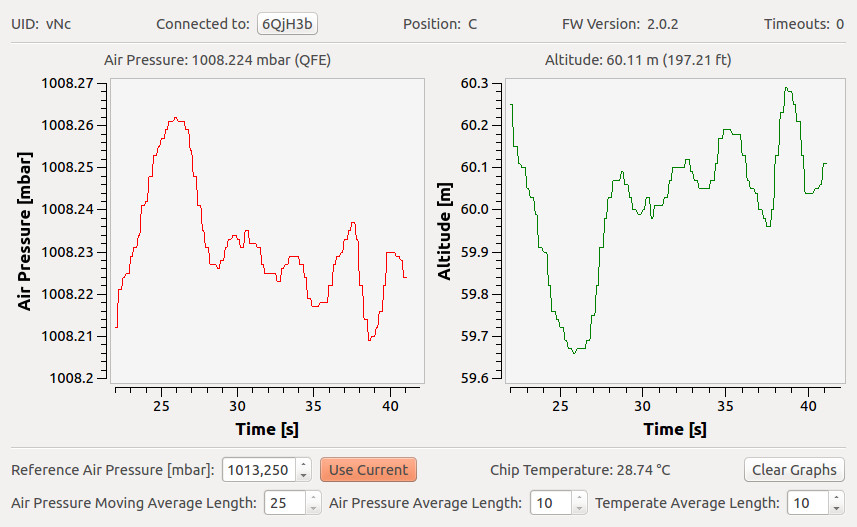
Is this normal behavior for Batometer Bricket? (Photo)
in General Discussion
Geschrieben
Video is not needed, very sorry for the confusion, the sensor is working properly. Last time when I did the test on the outside have to be affected by the weather, and my shaky hand is that I did it right behind the open window. It's amazing how reading has stabilized at a time when the sensor had a moment alone. My next step is suggested sensor fusion with IMU and GPS.