




photron
Administrators
-
Benutzer seit
-
Letzter Besuch
Alle erstellten Inhalte von photron
-
Dann bleibt eigentlich nur noch ein irgendwie gearteter Hardwaredefekt. Lassen sich beide Taster an der IMU normal drücken? Sprich, machen beiden beim Drücken ein Klickgeräusch und stecken nicht fest? Zum beschriebenen Verhalten würde es passen, wenn der Reset Taster klemmen würde und so die IMU dauerhaft im Reset Zustand hält.
-
reinweb, du hast keine Datei an deinen Post angehängt. Kannst du was über den zeitlichen Zusammenhang dieser 3 Zeilen sagen? Alle 3 Zeilen hängen mit dem Entpacken des Packet Headers zusammen. Alle drei sehen so aus als ob sie einen zu kurzen Header behandeln. Die receive Funktion ruft aber die handleResponse Funktion nur auf, wenn die komplettes Packet mit vollständigem Header empfangen wurde. Die einzige Möglichkeit die ich im Moment für diese Fehler sehe, ist, dass ein kaputtes Packet empfangen wurde in dem das Längen Feld im Header einen ungültigen Wert (kleiner 8 Bytes) enthalten hat. Das wird momentan noch nicht geprüft, steht aber auf der Todo Liste, dass in allen Bindings zu verbessern. Die Frage ist jetzt wo dies kaputtes Packet hergekommen ist. Interessant wäre es den Inhalt der $packet Variable zu sehen, wenn diese Fehler auftreten.
-
Bindings: JavaScript 2.0.11 Use browserify 13.1.1 to avoid the code hanging in Firefox Fix handling of fragmented packets Download: JavaScript
-
Bindings: JavaScript 2.0.11 Generator nutzt mindestens browserify 13.1.1 um Codehänger in Firefox zu vermeiden Behandlung fragmentierter Packets korrigiert Download: JavaScript
-
Es kommt in seltenen Fällen vor, dass ein Brick in einem komischen Zwischenzustand gerät. Dann hilft es aber normalerweise den Brick nochmal in den Bootloader Modus zu versetzen. Alternativ, statt den Erase Taster gedrückt halten und dabei einmal kurz Reset zu drücken, kannst du auch den Erase Taster gedrückt halten und dabei das USB Kabel einstecken, um den Brick in den Bootloader zu bekommen. Der Punkt ist, dass der Erase Taster gedrückt sein muss, wenn der Mikrocontroller des Brick startet, entweder durch Reset Taster drücken oder USB/Strom anstecken. Wenn du den Brick so in den Bootloader bekommen hast musst du allerdings nach dem Flashen den Brick von Hand neustarten.
-
Die Frage ist warum qtbase5-dev nicht installiert wird. Versucht mal dies: sudo apt-get install qtbase5-dev Wenn apt-get da auch wieder so was sagt wie: qt5-default : Depends: qtbase5-dev but it is not going to be installed Dann versuch die Kette weiter abzusteigen und das Package zu installieren, was nicht installiert wird, bis du eine andere Meldung bekommst die dann hoffentlich aufschlussreicher ist.
-
Okay, habe das Problem gefunden. Es betrifft alle Bindings, nicht nur C/C++. Aber nicht in allen Bindings wird das Problem auch sichtbar. Das Problem ist, dass die Bindings erwarten, dass die Resistance als uint16 übertragen wird, das PTC Bricklet diese aber als int32 überträgt. Dadurch ist der Empfangsbuffer (response) in den C/C++ Bindings für diese Antwort 2 Byte zu kurz. Das verursacht die Stackcorruption die Visual Studio meldet. Das Problem wird mit der nächsten Version der Bindings behoben werden.
-
Ich kann das Problem nachstellen, wenn ich die Visual Studio IDE nehme. Wenn ich aber direkt den Visual Studio Compiler aufrufe tritt das Problem nicht auf. Es muss also mit den Compileroptionen zu tun haben. Muss ich mir genauer ansehen. So auf den ersten Blick ergibt das keinen Sinn.
-
Das Problem mit den zu großen Unterlegscheiben in aktuellen Mounting Kits ist bekannt, sorry. In älteren Mounting Kits waren die Unterlegscheiben kleiner. Wir sind dran und das Problem sollte in Kürze gelöst sein.
-
Der Monoflop arbeitet pro Pin, nicht pro Port. Du kannst für jeden der 16 Pins den Monoflop anders einstellen. Das set_port_monoflop() eine Bitmaske nimmt erlaubt es den Monoflop für mehrere Pins exakt gleich zu konfigurieren. Du kannst aber in der Bitmaske auch jeweils nur ein Bit gesetzt haben und dadurch jeden Pin anders einstellen. Bei get_port_monoflop() muss du den einzelnen Pin angeben, da die Antwort für alle 8 Pins eines Port zu groß für einen Nachricht wäre. Denn da jeder Pin anders eingestellt sein kann müsste 8x die Time (uint32) und 8x die Remaining-Time (uint32) und eine Bitmaske für das Value (uint8) zurückgegeben werden. Macht 65 Byte für eine 64 Byte Nachricht. Das klappt also nicht.
-
Das sieht nach einem Hardwareschaden aus. Auf der Unterseite des RED Brick sitzen unter dem USB-A Stecker zwei kleine schwarze Bauteile. Eins mit 4 Beinchen (siehe Bild) und eins mit 6 Beinchen. Ich erwarte, dass das mit 4 Beinchen fehle. Wenn das der Fall ist, dann melde dich bitte bei info@tinkerforge.com und verweise auf den Thread hier.
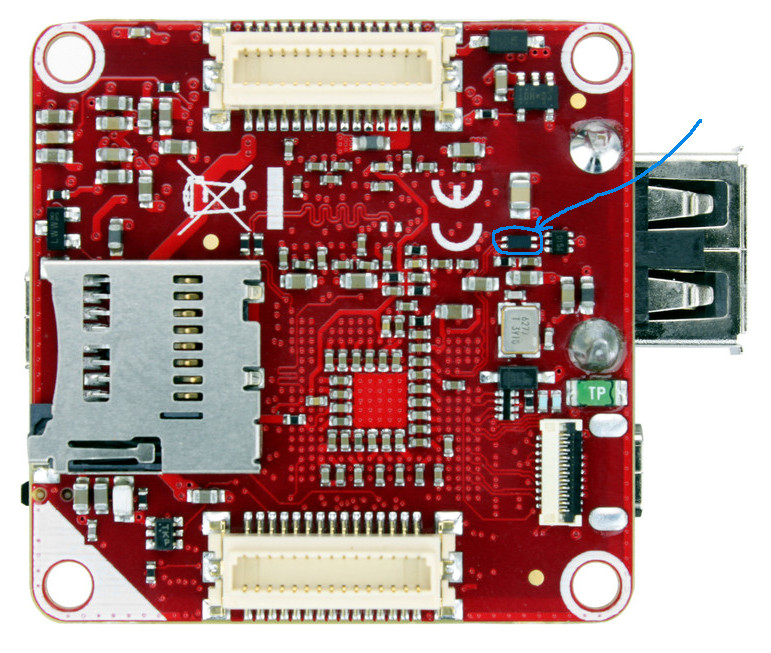
-
Der USB Host Anschluss am RED Brick muss nicht aktiviert werden. Das lsusb die Maus nicht auflistet ist komisch. Stecke mal bitte die Maus ab und und wieder an und lass dir dann die letzten 20 Zeilen Kernel Log auf dem RED Brick anzeigen: dmesg | tail -n 20 Am besten postet du die Ausgabe hier.
-
Are you using the correct UID in the example? Are you incorrectly using this Ambient Light Bricklet (1.0) example with an Ambient Light Bricklet 2.0?
-
Du kannst mehrere Enumerate Callback mit IPConnection.ENUMERATION_TYPE_AVAILABLE für das gleiche Brick(let) bekommen. Jeder Aufruf der enumerate() Funktion führt zu so einem Callback. Das meint wirklich jeder Aufruf. Dein Programm bekommt diesen Callback auch, wenn z.B. der Brick Viewer beim Connect ein Enumerate auslöst. Du musst also in deinem Enumerate Callback anhand der UID schauen, ob du das Brick(let) schon in der Liste hast und wenn ja, es nicht noch ein zweites mal hinzufügen, sondern ggf. seine Informationen aktualisieren.
-
Ah, Ubuntu hat das Package von php5 in php umbenannt. Das Setup Skript sollte jetzt damit umgehen können.
-
Das Problem besteht also weiterhin. Mal sehen was ich da tun kann.
-
Es gibt keine direkte Hardwaremöglichkeit die WIFI Extension 2.0 zu konfigurieren, bzw. AP an/abzuschalten. Jegliche Konfiguration erfolgt über die API des Master Bricks zu dem die WIFI Extension gehört. Siehe die "Wifi2" Methoden hier: http://www.tinkerforge.com/de/doc/Software/Bricks/Master_Brick_Java.html Ich denke deine Frage zielt darauf ab, dass du etwas bauen willst, dass dem klassischen Tanz der WIFI Konfiguration für IoT Geräte folgt. Initial ist das Gerät im AP Modus. Der Nutzer verbindet sich darauf und gibt dann seine WIFI Zugangsdaten ein. Dann startet das Gerät im Client Modus neu und verbindet sich mit dem eingestellten WIFI Netz. Die WIFI Extension 2.0 kann gleichzeitig AP und Client sein. Dass heißt, du hast einfach immer den AP an. Deine App (nehme ich mal an) verbindet sich dann mit der WIFI Extension über deren AP. Dann kann deine App den Client Teil der WIFI Extension konfigurieren. Ab dann ist die WIFI Extension 2.0 auch über das eingestellte WIFI Netz erreichbar.
-
Stimmt man kann nur aus der Liste wählen. Ich denke, es gibt keine speziellen Grund warum man die SSID nicht auch direkt angeben können sollte. Ich setze das mal auf die TODO Liste für Brick Viewer.
-
Das Problem ist mit WIFI Firmware 2.0.2 jetzt behoben.
-
Sprich, diese Version funktioniert, die offizielle 2.2.2 aber nicht? Kannst du das Problem denn reproduzieren, wenn du die offizielle 2.2.2 wieder installierst?
-
Verhält sich die angehängte Version besser? Admin-Edit: Veraltete brickd-Version entfernt.
-
Das ist komisch. Brick Daemon faked unter Windows Pipes mit zwei über localhost verbundenen Sockets. So eine Pipe ist auch die "USB Ready Pipe". Über diese Pipe wird der Event-Loop in brickd darüber informiert, dass USB Events vorliegen. Wenn das nicht funktioniert, dann "sieht" brickd die USB Geräte nicht. Warum es da zu einem Connection-Reset Fehler (WSAECONNRESET) kommt, ist mir nicht klar. An der zweiten Meldung ist komisch, dass da von COM die Rede ist. Ansonsten ließt sich das als ob brickd nicht das recht hätte zu sich selbst ein Socket Verbindung über localhost zu erstellen. Da es hilft den Dienst neuzustarten, könnte das ein Reihenfolgeproblem sein. Sprich brickd startet und erstellt die "USB Ready Pipe". Danach startet ein anderer Systemdienst der irgendwas mit localhost zutun hat. Das macht dann die Socket Verbindung über localhost in brickd kaputt. Ich kann das Problem hier auf unserem Windows 10 Labtop nicht nachstellen. Was hast du sonst so an Software installiert? Ich denke da zuerst an Virtualisierungssoftware, wie Hyper-V, VMware, Virtual Box etc. die was mit dem Netzwerk zu tun haben.
-
Es sieht aus als ob dir xbuild fehlt. Das kommt aus dem mono-xbuild Package, das Teil von mono-complete sein sollte. mono-complete sollte allerdings vom Build Environment Script installiert worden sein. Versuch mal das manual nachzuinstallieren: sudo apt-get install mono-xbuild
-
Firmware: WIFI Extension 2.0 2.0.2 Add missing ESP8266 SDK 2.0.0 configration binaries and adapt to ESP8266 configration API changes to fix boot and connection problems Download: WIFI Extension 2.0
-
Firmware: WIFI Extension 2.0 2.0.2 Fehlende ESP8266 SDK 2.0.0 Konfigurationsdateien hinzugefügt und Anpassungen an Änderungen in der ESP8266 Konfigurations API vorgenommen, um Start- und Verbindungsprobleme zu beheben Download: WIFI Extension 2.0