




borg
Administrators
-
Benutzer seit
-
Letzter Besuch
-
Gerade
Viewing Topic: Graphenbeschriftung fehlt in App
Alle erstellten Inhalte von borg
-
 @ArcaneDraconum: Du hast vermutlich recht, wir hatten zwischenzeitlich Probleme mit neueren Compilerversionen. Wir mussten ein paar NOPs einbauen um einen Compilerfehler zu verhindern der vermutlich dein Verhalten erklären kann: https://github.com/Tinkerforge/io4-bricklet/commit/5585f0c94263a4bd4b329f2f50a33670bf330afc Sprich: Vermutlich war die IO4 1.1.1 Firmware für eine Zeitlang ohne die NOPs auf dem Server und danach mit. Da war aber keine Boshaftigkeit unsererseits beteiligt. Ich hab gerade einfach die Versionsnummer um eins erhöht und es nochmal hochgeladen: https://github.com/Tinkerforge/io4-bricklet/commit/e2cffae8f6d244a3f0faa85f28314f5e08d9d279
 -
Hast du überprüft ob die UID passt?
-
Ah, ich das muss besser dokumentiert sein. der Power Mode wird nicht im EEPROM gespeichert. Beim start wird immer erst der Full Speed Modus verwendet. Dies ist leider notwendig, da es im Low Power Mode beim starten zu Timeouts kommen kann bei der initialen Enumerierung (falls ein großer Stapel verwendet wird). den Power Mode kann man entsprechend natürlich auch im laufenden Betrieb umstellen.
-
Kannst du die IO-4 Firmware einmal neu flashen?
-
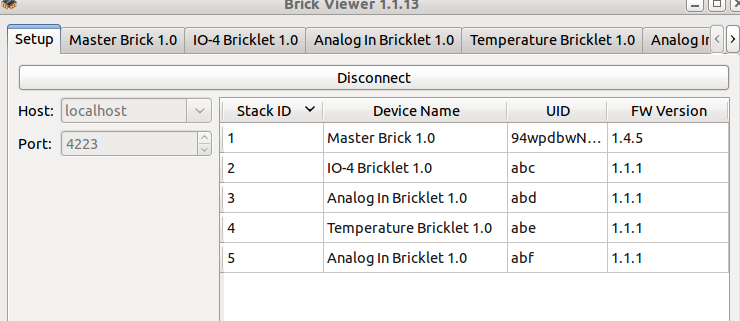
Ich kann es auch nicht reproduzieren. Ich hab einen Stapel bestehend aus Master Brick mit WIFI Extension und 2x Analog In, 1x Temperature, 1x IO4 (siehe Anhang für FW Versionen). Hab mich auch einmal per Ad Hoc WIFI drauf verbunden, geht auch.
-
Ups. Ich hatte früh genug ein neues bestellt. Aber da wir heute auf der Elektor Live Messe ausgestellt haben, hab ich es verpennt es rechtzeitig einzuspielen . Hab das gerade schnell nachgeholt.
-
Wir haben ein paar Schalter/Taster bei uns im Shop. Die kannst du alle zusammen mit dem IO4/IO16 Bricklet benutzen. Dazu musst du natürlich ein Käbelchen an die Schalter löten.
-
1) One possibility to kind of do this already is to use a Beagle Board or a Raspberry PI or similar. We discussed the possibility to make a "Linux Brick" with the standard 4x4cm size, but i fear that it would be hugely expensive compared to the cheap embedded linux boards now available. 2) In the near future we plan to offer an "on device programming interface", compatible to the arduino API. That means, you can then program the Bricks and Bricklets themself (you can do this already, but there isn't a nice API or documentation yet). 3) Another thing that we discussed already is a visual programming language, that you can use to generate some kind of state machine that can be transferred to and executed on Bricks and Bricklets. This would be very easy to use but only usable for smaller problems. We would very much like to have something like this in the future. Regarding your specific idea: The Brick that would control the other Bricks, would again be some kind of "Linux Brick". A Brick like this would cost us a fortune if we only produce it in our normal quantities (1000pcs). I doubt that people would be willing to pay 10x the amount as they do for a Raspberry PI for this. If we just use the normal Cortex M3 microcontroller, as on the other Bricks, we can also use the Master Brick itself to execute the code (as discussed in 3).
-
If there is a small PicoITX board on the PC, you could easily use a GSM USB stick. Like this thing: http://www.amazon.com/Sierra-Wireless-Lightning-305-aircard/dp/B0040DX9EW/ref=sr_1_1?ie=UTF8&qid=1350632203&sr=8-1&keywords=gsm+usb
-
Firmwares: Master Brick 1.4.5 Problem mit der Kombination RS485 + WIFI + Step-Down PS gefixt Download Firmwares: Master Brick
-
Firmwares: Master Brick 1.4.5 Fix Problem with RS485 + WIFI + Step Down PS combination Download Firmwares: Master Brick
-
The question is: Where can we buy apropriate plates that are cheap enough so we can resell them properly priced in our shop ? These Tamiya plates are intendet for modelmaking and modelmaking stuff is always freaking expensive.
-
Kannst du nochmal mit Master Brick Firmware Version 1.4.4 testen?
-
Firmwares: Master Brick 1.4.4 Chibi Extension Initialisierungssequenz gefixt Download Firmwares: Master Brick
-
Firmwares: Master Brick 1.4.4 Fix Chibi Extension initialization sequence Download Firmwares: Master Brick
-
Wann kannst du die Adresse nicht speichern, wenn die Chibi Extension als zweite Extension im Stack ist? Oder gar nicht? Mit Pinne meinte ich die Kontakte der Platine-zu-Platine Verbinder. Durch den Stack laufen 4 Leitungen pro Extension, also in Summe 8 Leitungen. Jede Extension schließt die ersten 4 Leitungen an und shiftet nach oben hin die letzten 4 Leitungen auf die ersten 4. Nur dadurch können überhaupt 2 Extensions verwendet werden. Dafür muss der Master Brick wissen welche Extension gerade wo ist, dies war früher nicht implementiert und da scheint es bei Chibi bzgl. der Kommunikation mit dem EEPROM noch Fehler zu geben. Gucke ich mir nachher an.
-
Kannst du das nochmal mit Master Brick Firmware Version 1.4.3 probieren? Ich befürchte der AP Modus wurde nie richtig konfiguriert, weil da eine Verwechselung in den defines war . https://github.com/Tinkerforge/master-brick/commit/2941a7062052e62a0817ad87098c213c0172dba5
-
Firmwares: Master Brick 1.4.3 Vertauschung von Ad Hoc DHCP und AP Static IP gefixt Download Firmwares: Master Brick
-
Firmwares: Master Brick 1.4.3 Fix mixup between Ad Hoc DHCP and AP Static IP Download Firmwares: Master Brick
-
The Temperature Bricklet uses I2C, there is no analog value comming from there. See the datasheet of the TMP102: https://github.com/Tinkerforge/temperature-bricklet/raw/master/datasheets/tmp102.pdf Also: The supply voltage of the Arduino is 5V, the supply voltage of the TMP102 is 3.3V!
-
Nagut, überredet. Dann halt "Voltage/Current Bricklet" als Name und "Voltage Current Bricklet" als gespeicherten Namen auf dem Bricklet wegen der parsebarkeit .
-
"Voltage Current Bricklet" ist definitiv besser als "Current Voltage Bricklet". Aber "Current/Voltage Bricklet" finde ich noch besser . Der Fokus liegt ja schon eher auf dem "Current" bei dem Bricklet.
-
Das geht nicht. Wenn du den DC Brick per USB anschließt, geht er davon aus dass du mit ihm über USB kommunizieren willst! Daher werden auch die anderen nicht angezeigt. Wenn du einen Stack baust musst du immer den USB Stecker in den untersten Master Brick stecken oder eine Step-Down Power Supply verwenden. Vermutlich ist der DC Brick nicht auf dem neusten Stand, einfach einmal die Firmware updaten. Alte Versionen vom DC Brick können die WIFI Extension stören: http://www.tinkerunity.org/forum/index.php/topic,673.msg5715.html#msg5715
-
Wir können als Namen auf dem Bricklet ja "Current Voltage Bricklet" speichern, aber im Shop usw trotzdem Current/Voltage Bricklet verwenden . Mit dem "/" ist einfach klarer was gemeint ist!
-
Firmwares: Master Brick 1.4.2 Support für Benutzung von zwei Extensions zur gleichen Zeit Unterstützte Kombinationen: WIFI oben/RS485 Master unten RS485 Master oben/WIFI unten RS485 Master oben/Chibi Slave unten Chibi Slave oben/RS485 Master unten Chibi Master oben/RS485 Slave unten RS485 Slave oben/Chibi Master unten Download Firmwares: Master Brick