Superp
Members
-
Benutzer seit
-
Letzter Besuch
Alle erstellten Inhalte von Superp
-
-
Yup, that version works fine for me.
-
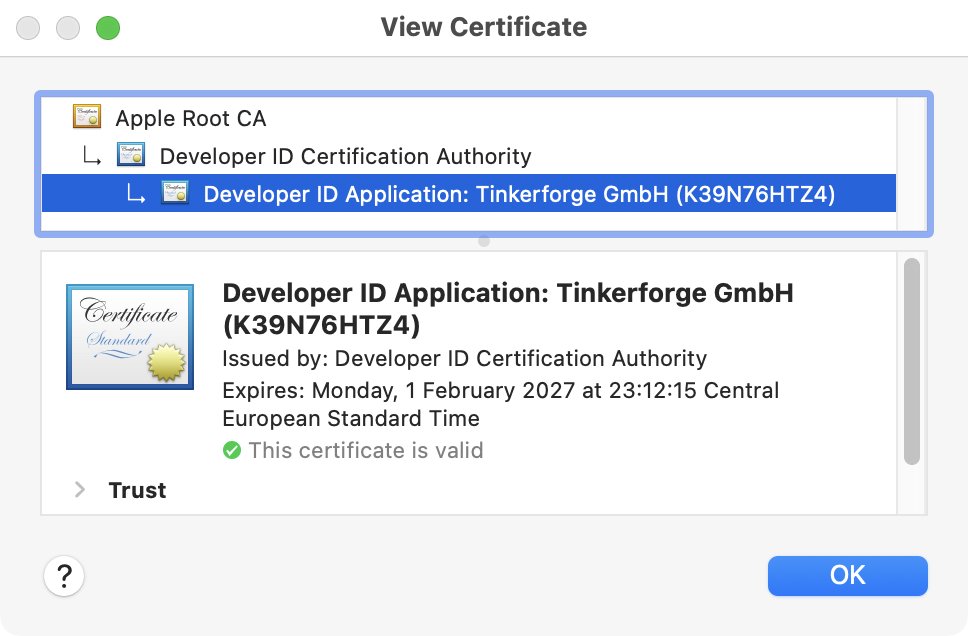
Also comforting:
-
Same msg & works here too.
-
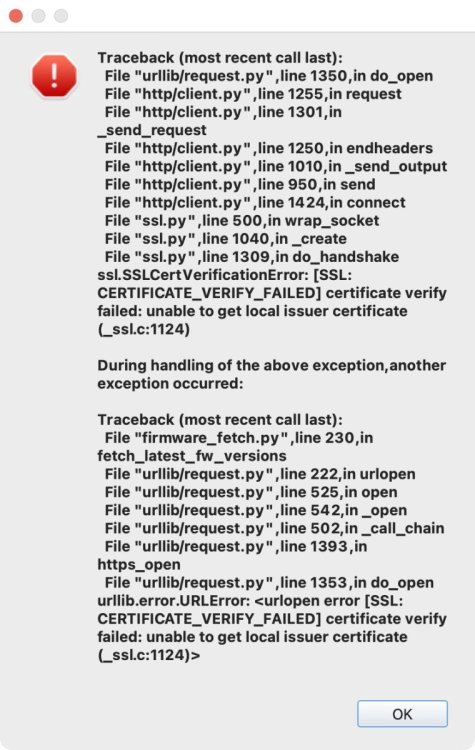
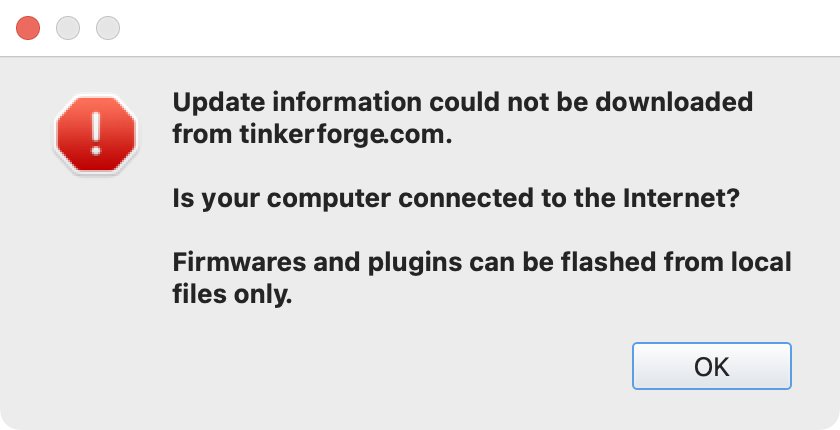
It reports an error. Click "OK" and it immediately returns, 3 times in total. The dialog below immediately appears 3-fold, stacked on top of each other:
-
@photron I have tried getting this version of brickv running. No success. I basically do not know what I'm doing trying to "fix" errors with Python. Alternate approach: I have captured brickv's network traffic in a .pcap file, when it 1) Does a clean start 2) Fetches update data 3) Quits. The pcap file is in your email. Maybe it is helpful.
-
I am willing to try, and have checked out that branch. However, I have no experience with the Python toolchain and so far have not succeeded in getting this running. I'll try again later.
-
This is stderr for curl -v https://download.tinkerforge.com/latest_versions.txt 2> curl_stderr.txt : curl_stderr.txt
-
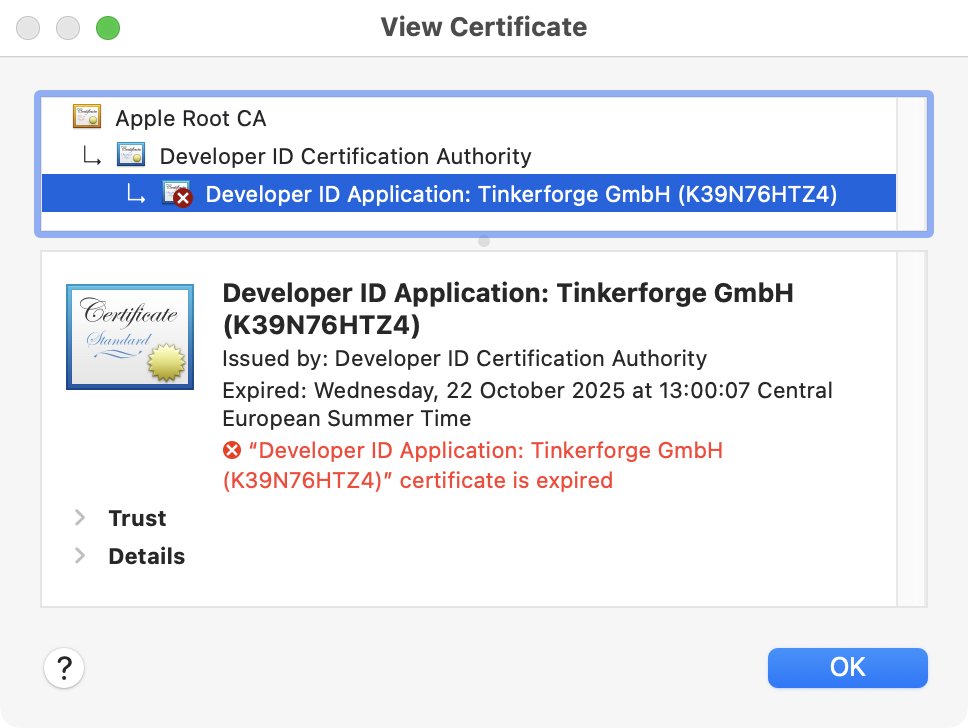
Hold your horses. That is not what happened. I ran into the above problem with Brickv and tried finding the cause. I did some digging and found your developer cert expired a few months ago. That's it: I did some digging. The expired developer certificate worries me a bit whether it is causing this trouble or not, but that is a different conversation. The URL "https://download.tinkerforge.com/latest_versions.txt" works fine with Safari, Curl, Wget, Python3, Ruby, and also Shortcuts. URL https://download.tinkerforge.com/ works too. Brickv reports an error.
-
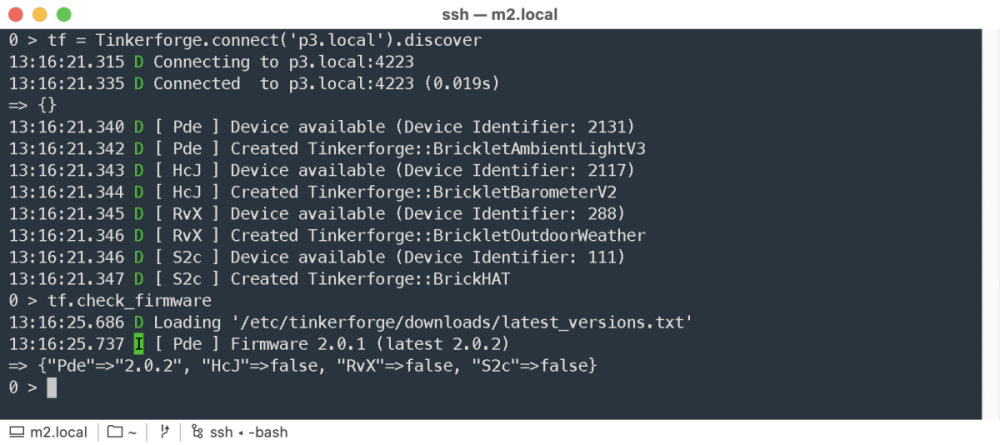
This morning I pushed an update that enables the Tinkerforge Ruby bindings to check firmware versions. To my surprise it immediately found a Bricklet with outdated firmware. For now it expects you to download latest_versions.txt yourself and put it in either ~/.config/tinkerforge/downloads or /etc/tinkerforge/downloads This is still somewhat experimental, your kilometrage may vary, etc. Feel free to port this code to your favourite programming language.
-
Completely removed Brickv 2.4.24 using Tinkertool → Rebooted → Installed Brickv 2.4.26 → Still the same problem.
-
Same here with Brickv 2.4.24. Weird, because version files seem to be fine here and here. Maybe a code signing thing with Apple? Update: it seems the developer certificate expired.
-
This is what I do: I keep a registry of all Tinkerforge devices in a YAML file: --- devices: 21LQ: inventory: name: GPS Bricklet 3.0 identifier: 2171 first seen: 2026-01-29 08:21:30 UTC last seen: 2026-01-29 08:21:30 UTC firmware: 2.0.0 connected: YwJ position: B host: esp1.local port: 4223 settings: fix_led_config: 1 status_led_config: 0 # 331 Lines skipped for brevity RvX: inventory: name: Outdoor Weather Bricklet identifier: 288 first seen: 2022-06-06 13:05:32 UTC last seen: 2026-01-28 08:14:32 UTC firmware: 2.0.4 connected: S2c position: c host: p3.local port: 4223 settings: status_led_config: 0 sensormap: 74: inside 61: outside 223: fridge # Et cetera...A little script regularly connects to all hosts, finds all devices through discovery, and updates the registry. Newly found devices automatically get added. Devices that stopped responding will have a stale 'last seen' value. YAML file sits in a Git repo.
-
Maybe AYCT–303, or Trust AYCT–102 ? Also see this list of devices that work but are not documented by Tinkerforge.
-
For those using Tinkerforge with Ruby and Tinderfridge: the Tinderfridge repository has moved from Github to Codeberg.
-
-
See also: LED Strip Bricklet 2.0 max voltage
-
See the thread Brick Daemon 2.4.6 not working for a discussion of the problem instructions for downgrading to brickd 2.4.5 (fix) a preview of brickd 2.4.7 (alternate fix)
-
-
-
Hello, I have upgraded four of our systems from brickd 2.4.5 -> 2.4.6, and brickd stopped responding on all of them: <I> <main_linux.c:385> Brick Daemon 2.4.6 started (architecture: arm, pid: 25228, daemonized: 1) <I> <main_linux.c:391> Running on Linux system (sysname: Linux, release: 6.1.21-v7+, version: #1642 SMP Mon Apr 3 17:20:52 BST 2023, machine: armv7l) <I> <bricklet.c:274> Found supported HAT product_id 0x084e in device tree, using default HAT Brick config <I> <bricklet.c:315> Found Bricklet port A (spidev: /dev/spidev0.0, driver: gpio, name: GPIO23, num: 23) <I> <bricklet_stack_linux.c:87> Using spidev backend for Bricklets, because Raspberry Pi without BCM2835 detected <I> <bricklet.c:315> Found Bricklet port B (spidev: /dev/spidev0.0, driver: gpio, name: GPIO22, num: 22) <I> <bricklet.c:315> Found Bricklet port C (spidev: /dev/spidev0.0, driver: gpio, name: GPIO25, num: 25) <I> <bricklet.c:315> Found Bricklet port D (spidev: /dev/spidev0.0, driver: gpio, name: GPIO26, num: 26) <I> <bricklet.c:315> Found Bricklet port E (spidev: /dev/spidev0.0, driver: gpio, name: GPIO27, num: 27) <I> <bricklet.c:315> Found Bricklet port F (spidev: /dev/spidev0.0, driver: gpio, name: GPIO24, num: 24) <I> <bricklet.c:315> Found Bricklet port G (spidev: /dev/spidev0.0, driver: gpio, name: GPIO7, num: 7) <E> <bricklet_stack_linux_spidev.c:263> Could not find line GPIO7 <I> <main_linux.c:579> Brick Daemon 2.4.6 stopped These systems are all Raspberry Pi 3 Model A Plus Rev 1.0 with a HAT Brick. Downgrading to brickd 2.4.5 fixed the problem on all four systems, for now. Is this a known issue?
-
Your photo does not show the motor type, but it shows "moons". Go to the moons website, look up the motor, click "recommended options" for cables etc. example
-
Moritz, In my experience, the Outdoor Weather Bricklet + TH-6148 is the best choice when you want reliable reading of ambient temperature and humidity. I have 4 of these sensors running, indoors and outdoors, all communicating wirelessly with the same Outdoor Weather Bricklet and can recommend it without reservations. Any T/H sensor inside a computer case will always give a reading that is off, because the temperature inside the box will be higher than the ambient temperature. The difference (inside box vs ambient) will change depending on conditions such as ventilation, room temperature, load of your CPU, etc. so is difficult to compensate for. The TH-6148 is electrically isolated from your system, and you can more easily experiment with its location. Location matters a lot for T/H sensors. The TH-6148 can also be read by anybody, directly, because it has its own display, which always works, no software needed. Many people appreciate this. Good luck!
-
-
Hi, The context (hardware, software, ...) of your question is not clear to me. Maybe you are using a Warp charger? There isa separate forum for that.